Automatic.css - Utility Framework for WordPress Page Builders v4.0.0 Nulled
No permission to download
- Thread starter Mrsam_1
- Start date
-
Welcome to Babiato! All resources are 100% clean and safe to use
📢 Join Our Official Telegram Channel For Updates
Bypass all resource restrictions, passwords, and keys? Read here!
You are using an out of date browser. It may not display this or other websites correctly.
You should upgrade or use an alternative browser.
You should upgrade or use an alternative browser.

- Aug 25, 2018
- 964
- 683
- 113
Using Firefox Dev & Chrome, Both work.Seems like when ACSS is active, text highlighting doesn't work on Firefox. Can someone confirm please?

- Jul 19, 2018
- 68,142
- 67,870
- 120
Oh, I should've ppinted out that I'm using ACSS 2.1.4 + Bricks 1.6Using Firefox Dev & Chrome, Both work.
I tried a clean WP install, installing Bricks, text highlighting works. Then as soon as I install and activate ACSS, I can't select any text on the frontend in Firefox. I don't know what's the issue...
As soon as I swap the ACSS plugin with an older version (2.0.1), it works.
Can someone who has an ACSS account report this bug?
- Aug 25, 2018
- 964
- 683
- 113
Did you try to clear the cache? Regenerate CSS files?Oh, I should've ppinted out that I'm using ACSS 2.1.4 + Bricks 1.6
I tried a clean WP install, installing Bricks, text highlighting works. Then as soon as I install and activate ACSS, I can't select any text on the frontend in Firefox. I don't know what's the issue...
As soon as I swap the ACSS plugin with an older version (2.0.1), it works.
Can someone who has an ACSS account report this bug?
- Jul 19, 2018
- 68,142
- 67,870
- 120
yep. It's fine in all other browsers except FF. Clean install, not a single tweak on Bricks or ACSS settings.Did you try to clear the cache? Regenerate CSS files?
- Jul 19, 2018
- 68,142
- 67,870
- 120
So I investigated this in further detail, and it turns out that the bug doesn't appear IF you are upgrading to v2.1.4 from an older version which was already installed, in which this bug isn't present. This happens with Oxy and Bricks as well.yep. It's fine in all other browsers except FF. Clean install, not a single tweak on Bricks or ACSS settings.
For those looking to enhance automatic.css with frames, I created a group buy thread for Frames:
If anyone would like to join me, it's going to cost $15.
If anyone would like to join me, it's going to cost $15.


beed5039
New member
- Nov 30, 2022
- 15
- 18
- 3
- Aug 25, 2018
- 964
- 683
- 113
Automatic.css (ACSS) v2.2 - NEW Features Overview (Merry Christmas!)
beed5039
New member
- Nov 30, 2022
- 15
- 18
- 3
Original, untouched 2.2.0.1Meanwhile a hotfix was released, so it's better worth waiting for someone to share the 2.2.0.1.
Attachments
- Jul 19, 2018
- 68,142
- 67,870
- 120

radityapratama
Active member
- Jul 30, 2020
- 87
- 140
- 33
radityapratama updated Automatic.css - Utility Framework for WordPress Page Builders with a new update entry:
Automatic.css - v2.2.0
Read the rest of this update entry...
Automatic.css - v2.2.0
Thanks to group buy participants for the updated resource!
2.2.0 Changelog
- New
- Grid variables
- All supported grid structures, up to 12 columns, and including auto grids.
- Contextual variables & classes
- var(—container-gap), var(—content-gap), var(—grid-gap)
- .container-gap, .content-gap, .grid-gap
- Editable from dashboard
- Backwards compatible with Frames contextual utilities
- Replaces Frames...
Read the rest of this update entry...
radityapratama
Active member
- Jul 30, 2020
- 87
- 140
- 33
radityapratama updated Automatic.css - Utility Framework for WordPress Page Builders with a new update entry:
Automatic.css - v2.2.0.1
Read the rest of this update entry...
Automatic.css - v2.2.0.1
Thanks to group buy participants for the updated resource!
2.2.0.1 Hotfix Changelog
Fixed a “Kevin is a moron” issue that was preventing changes to the new contextual variables from the dashboard.
Read the rest of this update entry...
kleiserantevou
Member
- Sep 13, 2022
- 17
- 36
- 13
Can anyone confirm from 2.2.0.1 version that classes grid--7 to grid--12 although exist, they are not showing at the classes input selector?
- Aug 25, 2018
- 964
- 683
- 113
YES, they are exciting!!!Can anyone confirm from 2.2.0.1 version that classes grid--7 to grid--12 although exist, they are not showing at the classes input selector?
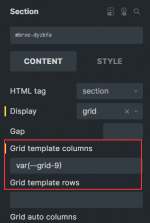
it should be written like this
 var(--grid-12) or --grid-12 > One dash after word "grid".
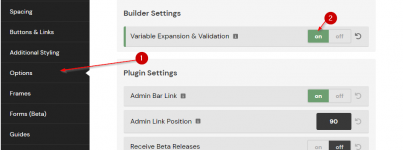
Also, make sure to turn on this

- Jul 19, 2018
- 68,142
- 67,870
- 120
This one allegedly got fixed in 2.2.0.2, among a few important hotfixes.Seems like when ACSS is active, text highlighting doesn't work on Firefox. Can someone confirm please?
beed5039
New member
- Nov 30, 2022
- 15
- 18
- 3
kleiserantevou
Member
- Sep 13, 2022
- 17
- 36
- 13
YES, they are exciting!!!
it should be written like this
Also, make sure to turn on this
I type at the class input grid--7 or grid--8 etc and it does not show up. Can you verify that it is working for you from grid--7 to grid--12?
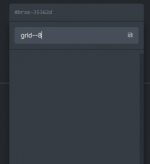
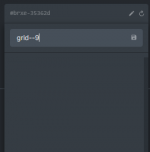
Only when i write them manually and press enter, after that they become available
- Aug 25, 2018
- 964
- 683
- 113
I type at the class input grid--7 or grid--8 etc and it does not show up. Can you verify that it is working for you from grid--7 to grid--12?
Only when i write them manually and press enter, after that they become available
Okay, I've rechecked.
The variables are all of them working fine... till grid 12.
Utility classes don't work from Grid-7.