Elementor Pro | WordPress Websites Builder [Premium]

Elementor Pro | WordPress Websites Builder [Premium] v4.1.2 Nulled

No permission to download
  • Welcome to Babiato Forum! All Resources are 100% clean and Safe to Use

Mrsam_1

Well-known member
Administrative
Trusted Seller
Jul 19, 2018
64,482
66,622
120
Mrsam_1 updated Elementor Pro | WordPress Websites Builder [Premium] with a new update entry:

Elementor Pro | WordPress Websites Builder [Premium] v4.0.1

Elementor Pro | WordPress Websites Builder [Premium] v4.0.1 Nulled
= 4.0.1 - 2026-04-01 =
  • Fix: Exposed text properties appear empty in existing components - Atomic Editor (#35357)
  • Fix: Cannot publish existing components with overridable properties - Atomic Editor
  • Fix: Unexpected characters appear when deleting attribute values using backspace - Atomic Editor

==
Alternate download link ( Workupload )...

Read the rest of this update entry...
 
  • Like
Reactions: w3tf4rt

Mrsam_1

Well-known member
Administrative
Trusted Seller
Jul 19, 2018
64,482
66,622
120
Mrsam_1 updated Elementor Pro | WordPress Websites Builder [Premium] with a new update entry:

Elementor Pro | WordPress Websites Builder [Premium] v4.0.2 Nulled

Elementor Pro | WordPress Websites Builder [Premium] v4.0.2 Nulled

= 4.0.2 - 2026-04-13 =
  • Fix: Interactions apply only to the first matching element instead of all instances on the page - Atomic Editor

==
Alternate download link ( Workupload )

=
Note: Folder has 3 files and readme

👉🏻 1: Nulled Elementor Pro ( Nulled properly, but you need to connect a free Elementor account for Kit...

Read the rest of this update entry...
 

party_on_acid

Member
Aug 12, 2025
86
9
8

Thanks a lot for the upodate!

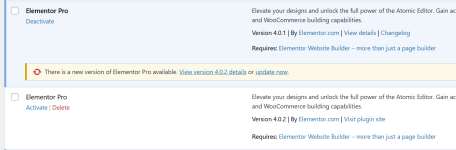
I've noticed that when you install this version elementor is not getting updated but being installed as a second elementor pro plugin. Am I doing something wrong here? or we should delete the older version of elementor pro and install the new v4.0.2 ?

Screenshot 2026-04-15 214528.png

Thanks in advance!
 

Minion01

Well-known member
Babiato Fan
Babiato Lover
Null Master
Trusted Seller
Trusted Uploader
Feb 27, 2019
4,944
4,058
120
Thanks a lot for the upodate!

I've noticed that when you install this version elementor is not getting updated but being installed as a second elementor pro plugin. Am I doing something wrong here? or we should delete the older version of elementor pro and install the new v4.0.2 ?

Screenshot 2026-04-15 214528.png

Thanks in advance!
I just checked, Few codes are changed in this latest version, you can say improved than previous. So use the latest version, you can remove previous version. ;)
 
  • Like
Reactions: party_on_acid

Mrsam_1

Well-known member
Administrative
Trusted Seller
Jul 19, 2018
64,482
66,622
120
Mrsam_1 updated Elementor Pro | WordPress Websites Builder [Premium] with a new update entry:

Elementor Pro | WordPress Websites Builder [Premium] v4.0.3

Elementor Pro | WordPress Websites Builder [Premium] v4.0.3
= 4.0.3 - 2026-04-20
  • Tweak: Updated base style font styling in Atomic Form - Atomic Editor
  • Fix: Submit button not working inside popups in Atomic Form - Atomic Editor
  • Fix: Forms fail to send when using ACF Email dynamic tag - Atomic Editor
  • Fix: Custom CSS editor not editable in RTL websites - Atomic Editor
==
Alternate download link ( Workupload )

Read the rest of this update entry...
 

party_on_acid

Member
Aug 12, 2025
86
9
8

@Mrsam_1 Thanks for updating the plugin!

I’ve recently noticed that, starting from version 4.0.0, newer Elementor Pro versions are no longer updating normally in WordPress. Instead, they are being installed as a separate plugin, and I can only activate them after deactivating and deleting the previous Elementor Pro version from the website.

With earlier versions of Elementor Pro (before 4.0.0), uploading the plugin would simply update the existing outdated version.

So is everything okay with the plugin?

PS: I highly appreciate your work!
 

Mrsam_1

Well-known member
Administrative
Trusted Seller
Jul 19, 2018
64,482
66,622
120
Mrsam_1 updated Elementor Pro | WordPress Websites Builder [Premium] with a new update entry:

Elementor Pro | WordPress Websites Builder [Premium] v4.0.4

Elementor Pro | WordPress Websites Builder [Premium] v4.0.4
= 4.0.4 - 2026-04-28
  • Fix: Flexbox and Div Block do not work with display conditions - Atomic Editor
  • Fix: Custom CSS editor not editable in RTL websites - Atomic Editor
==
Alternate download link ( Workupload )

=
Note: Folder has 3 files and a readme

👉🏻 1: Nulled Elementor Pro ( Nulled properly, but you need to connect a free...

Read the rest of this update entry...
 

Minion01

Well-known member
Babiato Fan
Babiato Lover
Null Master
Trusted Seller
Trusted Uploader
Feb 27, 2019
4,944
4,058
120

@Mrsam_1 Thanks for updating the plugin!

I’ve recently noticed that, starting from version 4.0.0, newer Elementor Pro versions are no longer updating normally in WordPress. Instead, they are being installed as a separate plugin, and I can only activate them after deactivating and deleting the previous Elementor Pro version from the website.

With earlier versions of Elementor Pro (before 4.0.0), uploading the plugin would simply update the existing outdated version.

So is everything okay with the plugin?

PS: I highly appreciate your work!
Yes, it's working fine. Take backup and replace the file if not replace delete old file. ;)
 

Minion01

Well-known member
Babiato Fan
Babiato Lover
Null Master
Trusted Seller
Trusted Uploader
Feb 27, 2019
4,944
4,058
120
BTW Sam thank you for the update, it's working great.
 

red.dot

New member
Banned User
May 19, 2026
14
2
3
Anyone having issues with Elementor Pro 4.0.4 nulled, getting no header found error?

This is due to Imunify deleting the elementor-pro.php.

As a workaround to this, using Gemini, created an updated script thats not flagged by Imunify but you dont have access to templates which is ok until a proper fix is available. I have tested and scanned with Imunify with clean result.. Test and provide feedback
 

Attachments

  • elementor-pro-test2.zip
    3.5 MB · Views: 2
  • Love
Reactions: Mrsam_1

Mrsam_1

Well-known member
Administrative
Trusted Seller
Jul 19, 2018
64,482
66,622
120
Mrsam_1 updated Elementor Pro | WordPress Websites Builder [Premium] with a new update entry:

Elementor Pro | WordPress Websites Builder [Premium] v4.1.0

Elementor Pro | WordPress Websites Builder [Premium] v4.1.0 Nulled Fixed
#### 4.1.0 - 2026-05-26

* Tweak: Added Radio Button element to Atomic Form - Atomic Editor
* Tweak: Added Select element to Atomic Form - Atomic Editor
* Tweak: Added Date Picker element to Atomic Form - Atomic Editor
* Tweak: Added Time Picker element to Atomic Form - Atomic Editor
* Tweak: Added File Upload element to Atomic Form - Atomic Editor
* Tweak: Added Webhook URL support to Atomic Form - Atomic Editor
*...

Read the rest of this update entry...
 
  • Like
Reactions: sainaasai

party_on_acid

Member
Aug 12, 2025
86
9
8

Thanks a lot for the uploads!

I just wanted to leave a small comment regarding the nulling of this plugin.

When you unzip and then re-zip the files of the “nulled” version of the archive folder, please keep the folder name as “elementor-pro” instead of “elementor-pro (v*** Nulled)”! If you change the name of the included folder, WordPress cannot match the filenames of the already installed Elementor Pro version with the one that is going to be installed. This leads to users having to delete the older version before installing the newer one.

This inconvenience can easily be avoided by simply keeping the name of the included folder the same as in the original version of the plugin, namely “elementor-pro”:

Elementor Pro (v*** Nulled).zip
....|_ elementor-pro [this is the folder which has to be named this way]
.......|_ plugin content [list of included files]


Good night :)
 

Minion01

Well-known member
Babiato Fan
Babiato Lover
Null Master
Trusted Seller
Trusted Uploader
Feb 27, 2019
4,944
4,058
120
Thanks a lot for the uploads!

I just wanted to leave a small comment regarding the nulling of this plugin.

When you unzip and then re-zip the files of the “nulled” version of the archive folder, please keep the folder name as “elementor-pro” instead of “elementor-pro (v*** Nulled)”! If you change the name of the included folder, WordPress cannot match the filenames of the already installed Elementor Pro version with the one that is going to be installed. This leads to users having to delete the older version before installing the newer one.

This inconvenience can easily be avoided by simply keeping the name of the included folder the same as in the original version of the plugin, namely “elementor-pro”:

Elementor Pro (v*** Nulled).zip
....|_ elementor-pro [this is the folder which has to be named this way]
.......|_ plugin content [list of included files]


Good night :)
Your reply is unclear. Please explain properly, is it for someone who uses it as an update or for a new user? I tested it on my end on a test site, and I don't see any issues.
 

party_on_acid

Member
Aug 12, 2025
86
9
8
Your reply is unclear. Please explain properly, is it for someone who uses it as an update or for a new user? I tested it on my end on a test site, and I don't see any issues.

Hi there! This can happen for a user who updated it from the original version of Elementor Pro or from a nulled version where the root folder was not mistakenly renamed to a different name.

If you look into the original archive, you will see that the root folder is called “elementor-pro”. Therefore, if you name it differently, WordPress won’t recognize the plugin as the same one and will require you to delete the old version and then activate the newly installed one.

To test it, you can download the nulled version of v4.0.4 from here (upload history), which has the correct root folder name. Install it, and then try to update it with the latest nulled version from this page - v4.1.0 - which has the wrong root folder name. You won’t be able to do it unless you delete the older version of the plugin. This error is caused by the incorrect naming of the root folder.
 
Last edited:

Minion01

Well-known member
Babiato Fan
Babiato Lover
Null Master
Trusted Seller
Trusted Uploader
Feb 27, 2019
4,944
4,058
120
Yes, I can replicate the issues. You caught a good point. Sam already liked your reply, so this will be fixed next time.

For old users using this version, please rename the Elementor Pro nulled to elementor-pro then the plugin auto replace previous version.
 
  • Like
Reactions: Mrsam_1

Minion01

Well-known member
Babiato Fan
Babiato Lover
Null Master
Trusted Seller
Trusted Uploader
Feb 27, 2019
4,944
4,058
120
Hi there! This can happen for a user who updated it from the original version of Elementor Pro or from a nulled version where the root folder was not mistakenly renamed to a different name.

If you look into the original archive, you will see that the root folder is called “elementor-pro”. Therefore, if you name it differently, WordPress won’t recognize the plugin as the same one and will require you to delete the old version and then activate the newly installed one.

To test it, you can download the nulled version of v4.0.4 from here (upload history), which has the correct root folder name. Install it, and then try to update it with the latest nulled version from this page - v4.1.0 - which has the wrong root folder name. You won’t be able to do it unless you delete the older version of the plugin. This error is caused by the incorrect naming of the root folder.
Btw, if your cpanel hosting has Imunify360, can you check if it shows any error regarding the new version?
 

About us

  • Babiato Forum - The webmaster community has been around for many years and pride ourselves on offering unbiased, critical discussion among people of all different backgrounds. We are working every day, updating Daily resource to make sure our community is one of the best.

Quick Navigation

User Menu