


amanat400
Member
- Dec 17, 2023
- 32
- 4
- 8
How to Use Muse AI for Free and Get 1 Billion Tokens
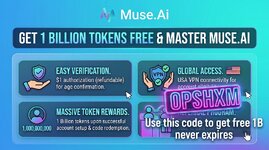
Want to try Muse AI for free and get 1 billion tokens without paying for a subscription? In this tutorial, I'll show you the complete step-by-step process.
Follow each step carefully.Reference Code: 0PSHXM
Step 1: Download a VPN on Your Android Phone
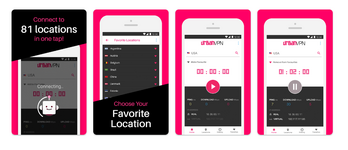
First, take your Android mobile and open the Google Play Store.Search for URBAN VPN and install it on your phone.
Once installed:
- Open URBAN VPN.
- Select the USA as your location.
- Connect the VPN.
- Make sure the VPN is successfully connected before moving to the next step.
Step 2: Clear Your Chrome Browser Cache
Now open Google Chrome on your Android phone.Before opening Muse AI, clear your Chrome browser cache and browsing data.
This helps ensure that your previous location, session, or website data does not interfere with the process.
After clearing the cache, open the Muse AI website in Chrome.
Step 3: Create or Use a Fresh Gmail Account
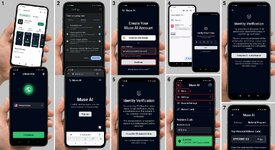
When Muse AI asks you to log in, use a Gmail account that has not previously been used with Facebook/Muse AI for this process.For the smoothest setup, I recommend creating a new Gmail account specifically for this.
Enter your Gmail address and continue with the registration process.
Step 4: Verify Your Gmail
After entering your Gmail address, Muse AI will send a verification code to your email.Open Gmail and find the verification email.
Copy the verification code.
Go back to the Muse AI tab and enter the code to complete the email verification.
Step 5: Complete Age Verification
Next, Muse AI may ask you to verify your age.As part of the verification process, you may be asked to complete a $1 transaction/authorization.
Don't worry: this is an authorization/verification charge and is expected to be refunded.
The refund can take around 5-7 days, although in some cases it may appear much faster. In my case, the amount was returned within seconds.
Complete the verification process and continue.
Step 6: Redeem the 1 Billion Token Code
Once your account is verified, you may notice that you don't have any tokens yet.Now it's time to redeem the reference code.
At the bottom of the Muse AI interface, tap the three-line menu.
Then:
Menu → Settings → General Settings → Redeem Code
In the Redeem Code section, enter the following code:
0PSHXM
Submit the code.If the promotion is still active and your account is eligible, the code should provide 1 billion free tokens.
Step 7: Create Your Own Invite Code
There is another useful feature you can take advantage of.After setting up your account, you can create your own invite/referral code and share it with your friends or other users.
When eligible users use your invite code, you can receive additional token rewards according to Muse AI's current referral program.
The more eligible people who use your referral code, the more rewards you may be able to receive, subject to Muse AI's current terms and limits.
Quick Summary
Here is the complete process:- Download URBAN VPN from the Google Play Store.
- Connect the VPN to a USA location.
- Clear your Chrome cache.
- Open Muse AI.
- Sign up using a fresh Gmail account.
- Verify your Gmail using the code sent to your email.
- Complete the age verification process.
- Complete the $1 verification/authorization if requested.
- Go to Menu → Settings → General Settings → Redeem Code.
- Enter reference code: 0PSHXM
- Redeem the available token reward.
- Create and share your own invite code to earn additional referral rewards when eligible.


