Gojek Clone App - On-Demand Multi Service App

Gojek Clone App - On-Demand Multi Service App v2024

No permission to download
  • Welcome to Babiato Forum! All Resources are 100% clean and Safe to Use

allmovienet

New member
Nov 13, 2022
0
8
0
Installation is simple:

1) have a VPS, with mongodb working, php 7.4 and possibly Cpanel
2) upload web files
3) replace the domain name "domain.com" with the domain name of your website, in the following files:
- .htaccess
- include_config_inc.php
- include_taxi_webservices.php
- licence.php
- /assets/libraries/defines.php
4) enter host, user, database and password in /assets/libraries/db_info.php

if you have Cpanel, the web part must work, in the absence of further changes.
If you use another Panel, you must remove from .htaccess, the part that you find at the end of the file, concerning the Cpanel settinDid you set up a link
Did you set it up successfully? Can you share a link?
 

madunm

New member
Aug 25, 2022
1
0
1
s
Installation is simple:

1) have a VPS, with mongodb working, php 7.4 and possibly Cpanel
2) upload web files
3) replace the domain name "domain.com" with the domain name of your website, in the following files:
- .htaccess
- include_config_inc.php
- include_taxi_webservices.php
- licence.php
- /assets/libraries/defines.php
- include_config.php (sorry)
4) enter host, user, database and password in /assets/libraries/db_info.php

if you have Cpanel, the web part must work, in the absence of further changes.
If you use another Panel, you must remove from .htaccess, the part that you find at the end of the file, concerning the Cpanel setting1.png
share a link to ur site
 
  • Like
Reactions: baley78666

pipopipotes

New member
Apr 6, 2021
17
5
3
Installation is simple:

1) have a VPS, with mongodb working, php 7.4 and possibly Cpanel
2) upload web files
3) replace the domain name "domain.com" with the domain name of your website, in the following files:
- .htaccess
- include_config_inc.php
- include_taxi_webservices.php
- licence.php
- /assets/libraries/defines.php
- include_config.php (sorry)
4) enter host, user, database and password in /assets/libraries/db_info.php

if you have Cpanel, the web part must work, in the absence of further changes.
If you use another Panel, you must remove from .htaccess, the part that you find at the end of the file, concerning the Cpanel setting1.png


hello friend
I have a doubt about the installation destination

domain.com or domini.com/web
 
N

ngan

Guest
excuse me I do not understand. You must replace, with an editor, in the files indicated above, the "domain.com" with the name of your domain
 

domenikk

New member
Oct 2, 2022
0
0
0
Installation is simple:

1) have a VPS, with mongodb working, php 7.4 and possibly Cpanel
2) upload web files
3) replace the domain name "domain.com" with the domain name of your website, in the following files:
- .htaccess
- include_config_inc.php
- include_taxi_webservices.php
- licence.php
- /assets/libraries/defines.php
- include_config.php (sorry)
4) enter host, user, database and password in /assets/libraries/db_info.php

if you have Cpanel, the web part must work, in the absence of further changes.
If you use another Panel, you must remove from .htaccess, the part that you find at the end of the file, concerning the Cpanel setting1.png
hai teman saya menggunakan cpannel untuk mencoba cara anda tetapi masih error, anda tidak memberikan letak atau baris atau screenshot untuk mengganti di 3) mengganti nama domain "domain.com" dengan nama domain situs web Anda, dalam file berikut:
- . htaccess
- include_config_inc.php
- include_taxi_webservices.php
-
licence.php - /assets/libraries/defines.php
- include_config.php (maaf), tolong bantuannya teman agar bisa menjangkau
Installation is simple:

1) have a VPS, with mongodb working, php 7.4 and possibly Cpanel
2) upload web files
3) replace the domain name "domain.com" with the domain name of your website, in the following files:
- .htaccess
- include_config_inc.php
- include_taxi_webservices.php
- licence.php
- /assets/libraries/defines.php
- include_config.php (sorry)
4) enter host, user, database and password in /assets/libraries/db_info.php

if you have Cpanel, the web part must work, in the absence of further changes.
If you use another Panel, you must remove from .htaccess, the part that you find at the end of the file, concerning the Cpanel setting1.png
hi friend i used cpannel to try your way but still error, you don't provide location or line or screenshot to replace in 3) replace the domain name "domain.com" with your website's domain name, in the following file:
- . htaccess
- include_config_inc.php
- include_taxi_webservices.php
-
license.php - /assets/libraries/defines.php
- include_config.php (sorry), please help friends so they can reach
 

pipopipotes

New member
Apr 6, 2021
17
5
3
excuse me I do not understand. You must replace, with an editor, in the files indicated above, the "domain.com" with the name of your domain

Hello friend I ask:
The installation should be done on my domain.com or domain.com/web?

I ask you because I have done the instructions you give, however the page does not load, it remains blank as some user wrote above.

Thank you very much!
 

digitalfriend

Member
Trusted Uploader
Banned User
Feb 8, 2021
58
95
18
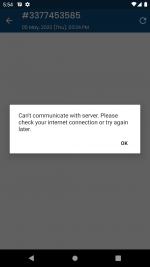
I face this issue when I try to open the order details page. Any help will be appreciated.

Screenshot_20220507_175503.png
 

About us

  • Babiato Forum - The webmaster community has been around for many years and pride ourselves on offering unbiased, critical discussion among people of all different backgrounds. We are working every day, updating Daily resource to make sure our community is one of the best.

Quick Navigation

User Menu