


Gravity Forms | The Best WordPress Form Plugin | Form Builder v3.2.0.1 Nulled + All Addons
No permission to download
- Thread starter Mrsam_1
- Start date
-
Welcome to Babiato Forums!
📢 Join Babiato Official Telegram Channel For Updates
Bypass all resource restrictions, passwords, and keys? Read here!
You are using an out of date browser. It may not display this or other websites correctly.
You should upgrade or use an alternative browser.
You should upgrade or use an alternative browser.

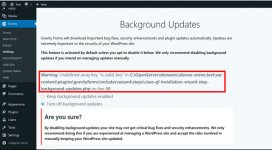

Just install on previous WP version (older than 6.02) then update the WP. It should be fine!An error appears when installing the latest version (2.6.7) on a freshly installed WordPress (6.0.2). What can it be?
lucasflores
New member
- Jun 10, 2020
- 12
- 0
- 1
Hi Thanks so much for all these sharing. Can you tell me how can I use these addons please? They need to be nulled? How can I do that?@Tomz these are all the gravity form addons but need to be implemented with the developer license I have sent you before, or simply use that code to install manually.

jolitravail
Member
- May 6, 2020
- 46
- 13
- 8

The attached version should fix the issue.An error appears when installing the latest version (2.6.7) on a freshly installed WordPress (6.0.2). What can it be?
Attachments
Gravity Forms v2.6.8 Changelog
- Fixed an accessibility issue with the consent field description.
- Fixed an accessibility issue that prevents the show/hide password button from read by screen readers.
- Fixed an issue where editing an entry with a multifile upload field could result in broken links to files. Credit: GravityWiz
- Removed an unused javascript function.

pacc
Member
- Dec 28, 2020
- 35
- 10
- 8

- Jul 19, 2018
- 70,738
- 68,705
- 120
Please share with @Tomz before attached to post because most of users struggle with downloading different folders and it's get more confusing.Gravity Forms 2.6.8 - original

- May 24, 2018
- 79,198
- 112,429
- 120
Tomz updated Gravity Forms - Best Plugin Forms For WordPress with a new update entry:
Gravity Forms v2.6.8
Read the rest of this update entry...
Gravity Forms v2.6.8
Download Gravity Forms v2.6.8 - WordPress Forms Plugin Free Nulled
v2.6.8 | 2022-11-09
- Fixed an accessibility issue with the consent field description.
- Fixed an accessibility issue that prevents the show/hide password button from read by screen readers.
- Fixed an issue where editing an entry with a multifile upload field could result in broken links to files. Credit: GravityWiz
- Removed an unused javascript function.
Read the rest of this update entry...
- May 24, 2018
- 79,198
- 112,429
- 120
Tomz updated Gravity Forms - Best Plugin Forms For WordPress with a new update entry:
Gravity Forms v2.6.8.1
Read the rest of this update entry...
Gravity Forms v2.6.8.1
Download Gravity Forms v2.6.8.1 - WordPress Forms Plugin Free Nulled
v2.6.8.1
- Fixed an issue where the gform_require_login filter isn't called in all contexts the form requireLogin property is checked.
Read the rest of this update entry...
- May 24, 2018
- 79,198
- 112,429
- 120
seems someone shared alreadyNope, it needs to be a separate request as you said.
let me approve it
- May 24, 2018
- 79,198
- 112,429
- 120

quantum777
New member
- Nov 21, 2020
- 5
- 0
- 1
Greetings, whats the different between gravity form elite licence and starter licence, and also, does any one have the elite licence?

I have a question regarding the add-ons. I installed the Square Add on i am not seeing it in the settings. What i am wondering is if because its nulled to basic, that's why I can't see the square options, and is there a way around this? I downgraded a few versions and i get the same things


