S
Shanjannat
Guest
i have already downloaded and activate theme but elementor is not showingPlease explain properly with screenshots if possible. Can't help otherwise.

i have already downloaded and activate theme but elementor is not showingPlease explain properly with screenshots if possible. Can't help otherwise.

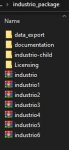
demons in the site are 7 types 1 to 7 but in files are different! why?!!Please explain properly with screenshots if possible. Can't help otherwise.


Download Industrial v1.0 - Industry & Factory WordPress Nulled Free
Industrial Theme v1.0 - 8 April 2021
Why this theme has many theme files in there TomzTomz updated Industrial - Industry & Factory WordPress with a new update entry:
Industrial Theme v1.0 - 8 April 2021
Read the rest of this update entry...
same theme but with diffrent demosWhy this theme has many theme files in there Tomz
i love @TomzTomz updated Industrial - Industry & Factory WordPress with a new update entry:
Industrial Theme v1.0 - 8 April 2021
Read the rest of this update entry...

Last update date of this theme : 6 April 2022Can you tell us, update to WHAT please?
Download Industrial v1.0 - Industry & Factory WordPress Nulled Free
v1.0 - 6 April 2022
DoneLast update date of this theme : 6 April 2022
I did but not able to find Berlin demoRead theme's docs
Step 1: Install Theme Dashboard / Appearance / Themes / Add New / Install file theme: industrio.zip
Step 2: Install and Active Plugin Dashboard / Appearance / Install Plugins / Chosen All and Install and Active
Step 3: Import Theme Options Dashboard / industrio Options / Import - Export / Copy Text from file theme_options.txt and Paste to Area "Import from file"
Step 4: Import Content Dashboard / Tools / Import / Chosen WordPress - Run Importer / Chosen File content.xml / Upload file and import / Click to checkbox "Download and import file attachments" / Submit
Step 5: Import Widget Dashboard / Tools / Widget Importer & Exporter / Chosen file widget.wie / Import Widget
Step 6: Import Template Elementor Dashboard / Templates / Saved Templates / Import Templates / Chosen folder "template-elementor" file "elementor-templates.zip"
Step 7: Create New Home Page and Insert Template Elementor Dashboard / Pages / Add New / Add Title: Home / Chosen Template: Home / Edit with Elementor / Add Template Elementor "Home" / Publish
 shtheme.com