LaraClassifier - Classified Ads Web Application By BedigitCom

LaraClassifier - Classified Ads Web Application By BedigitCom v19.0.1 Nulled Fixed

No permission to download

vovodimmirb2

New member
Babiato Fan
Sep 18, 2024
15
2
3
Last version v19.0.1 have same problem. 3-5 days after installl get Disk space is full 24gb, but shouldn't bev
NO clear the cache folder under /storage/framework/cache/data
CRON JOB NO CLEANER

/usr/sbin/php8.4 /home/salerainbow/web/salerainbow.com/public_html/artisan schedule:run >> /dev/null 2>&1
/usr/bin/php8.4 /home/salerainbow/web/salerainbow.com/public_html/artisan cache:clear
/usr/bin/php8.4 /home/salerainbow/web/salerainbow.com/public_html/artisan listings:purge
/usr/bin/php8.4 /path/to/public_html/utils/schedule-run.php
cd /home/salerainbow/web/salerainbow.com/public_html && php artisan schedule:run >> /dev/null 2>&1
 

Minion01

Well-known member
Babiato Fan
Babiato Lover
Null Master
Trusted Seller
Trusted Uploader
Aug 3, 2018
6,789
6,230
120
These issues. Looks like an issue on the dev side. Let me check if I can do any workaround for this.
Till then, try this solution.

Open your .env file and change:


View hidden content is available for registered users!


Also do this
Add a daily or twice-weekly cron job in your hosting control panel (cPanel/StackCP) to automatically purge expired cache files inside that specific directory:


View hidden content is available for registered users!


This command safely looks inside storage/framework/cache/data/ and deletes any cache file older than 2 days, preventing disk exhaustion without affecting active application data.
 

vovodimmirb2

New member
Babiato Fan
Sep 18, 2024
15
2
3
Th...you for help
its to cron job?
find /home/salerainbow/web/salerainbow.com/public_html/storage/framework/cache/data/ -type f -mtime +2 -delete
 

Minion01

Well-known member
Babiato Fan
Babiato Lover
Null Master
Trusted Seller
Trusted Uploader
Aug 3, 2018
6,789
6,230
120
These issues. Looks like an issue on the dev side. Let me check if I can do any workaround for this.
Till then, try this solution.

Open your .env file and change:


*** Hidden text: cannot be quoted. ***


Also do this
Add a daily or twice-weekly cron job in your hosting control panel (cPanel/StackCP) to automatically purge expired cache files inside that specific directory:


*** Hidden text: cannot be quoted. ***


This command safely looks inside storage/framework/cache/data/ and deletes any cache file older than 2 days, preventing disk exhaustion without affecting active application data.
I've updated my reply try these solution, it should work.
Also give feedback! ;)
 

Minion01

Well-known member
Babiato Fan
Babiato Lover
Null Master
Trusted Seller
Trusted Uploader
Aug 3, 2018
6,789
6,230
120
Th...you for help
its to cron job?
find /home/salerainbow/web/salerainbow.com/public_html/storage/framework/cache/data/ -type f -mtime +2 -delete
Try this first.

View hidden content is available for registered users!
 

Minion01

Well-known member
Babiato Fan
Babiato Lover
Null Master
Trusted Seller
Trusted Uploader
Aug 3, 2018
6,789
6,230
120
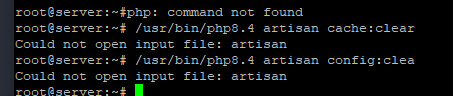
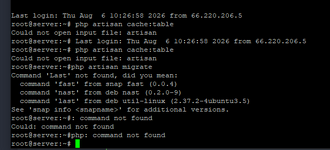
The error "Could not open input file: artisan" happens because you are running the command from your user's home directory (root@server:~#) instead of inside your website's root folder where the Laravel files are actually located.

View hidden content is available for registered users!
 

Minion01

Well-known member
Babiato Fan
Babiato Lover
Null Master
Trusted Seller
Trusted Uploader
Aug 3, 2018
6,789
6,230
120
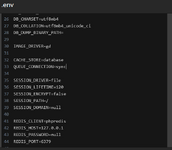
Как изменить CACHE_STORE на redis?
2026-08-10_073010.png
Use only English, i don't know your language.
Also told you

View hidden content is available for registered users!
 

Minion01

Well-known member
Babiato Fan
Babiato Lover
Null Master
Trusted Seller
Trusted Uploader
Aug 3, 2018
6,789
6,230
120
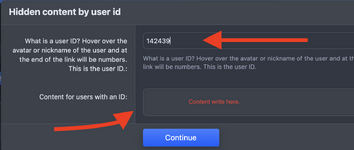
Very bad idea to share all details like this publicly. Keep your site safety in Mind Instead use tag to share details.
Like this

1786362115941.png

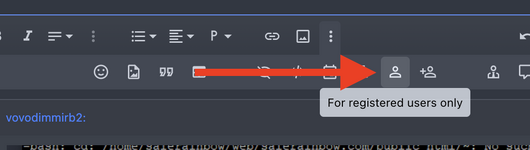
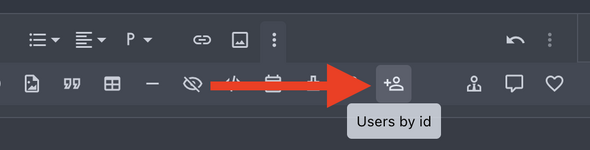
Or if you want only me to see your reply, do this.

1:
1786362168596.png

2:
1786362229983.png

==

About your settings now.
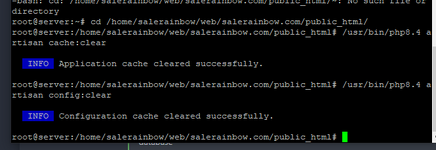
Yes, exactly like that! You successfully navigated to the directory and cleared both the application and configuration caches.

As long as your .env file has CACHE_STORE=redis set, your application is now fully configured to use Redis memory. Your hard drive storage will no longer be flooded with gigabytes of cache files, permanently fixing the disk space issue!
 

vovodimmirb2

New member
Babiato Fan
Sep 18, 2024
15
2
3
ТH..YOU FOR HELP, I CHANGE MAY VPS PASSORD. it's not real website tn..you
one more question about cron job see please its corect or i need some changes?
/usr/sbin/php8.4 /home/salerainbow/web/salerainbow.com/public_html/artisan schedule:run >> /dev/null 2>&1
/usr/bin/php8.4 /home/salerainbow/web/salerainbow.com/public_html/artisan cache:clear
/usr/bin/php8.4 /home/salerainbow/web/salerainbow.com/public_html/artisan listings:purge
/usr/bin/php8.4 /path/to/public_html/utils/schedule-run.php
cd /home/salerainbow/web/salerainbow.com/public_html && php artisan schedule:run >> /dev/null 2>&1
 

Minion01

Well-known member
Babiato Fan
Babiato Lover
Null Master
Trusted Seller
Trusted Uploader
Aug 3, 2018
6,789
6,230
120
ТH..YOU FOR HELP, I CHANGE MAY VPS PASSORD. it's not real website tn..you
one more question about cron job see please its corect or i need some changes?
/usr/sbin/php8.4 /home/salerainbow/web/salerainbow.com/public_html/artisan schedule:run >> /dev/null 2>&1
/usr/bin/php8.4 /home/salerainbow/web/salerainbow.com/public_html/artisan cache:clear
/usr/bin/php8.4 /home/salerainbow/web/salerainbow.com/public_html/artisan listings:purge
/usr/bin/php8.4 /path/to/public_html/utils/schedule-run.php
cd /home/salerainbow/web/salerainbow.com/public_html && php artisan schedule:run >> /dev/null 2>&1
No problem! I’m just giving back to the babiato forum and helping out. ;)


Keep only these two lines active in your server's cron manager:

View hidden content is available for registered users!
 

About us

  • Babiato Forum - The webmaster community has been around for many years and pride ourselves on offering unbiased, critical discussion among people of all different backgrounds. We are working every day, updating Daily resource to make sure our community is one of the best.

Quick Navigation

User Menu