TassieNZ
Old Age lusty uncle
Download link updated now. Thanks to @freenulled for helping out when I was snowed under with work. 
Last edited:

Bypass all resource restrictions, passwords, and keys? Read here!


Download Really Simple SSL Pro v2.1.6 Nulled Free
= v2.1.6 =
- Enabled some security headers by default.
- Show HSTS preload option after enabling HSTS option without reloading page
- Updated support tab to pre-fill fields on really-simple-ssl.com, directly sending from support tab resulted in some undelivered e-mails
Download Really Simple SSL Pro v2.1.7 Nulled Free
= v2.1.7 =
Tested with WordPress 5.3
== Change log ==
= 2.1.8 =
* Fixed a bug which could prevent the Content Security Policy generator endpoint from working on specific setups with a site in a subfolder.
Download Really Simple SSL Pro v2.1.9 Nulled Free
= v2.1.9 =
* Fixed a bug where the rest route wouldn't initialize
Although the previous upload was activated, it showed the license expired in 1970 ... bad for my ADHD!!! This shows Your license is valid, and expires on: January 1, 2050
== Change log ==
= 2.1.10 =
* Removed error logging from CSP class
== Change log ==
= 2.1.11 =
- Fixed some untranslatable strings in security headers help tips
- Added German formal translations thanks to Thorsten Wollenhöfer
== Change log ==
= 2.1.12 =
* Fixed a bug where the SSL page could not be opened on multisite installations


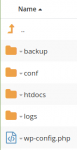

Look under /etc/nginx/sites-enabled/something.conf@TassieNZ or someone could you please explain to me the exact path to which I should paste this procedure below:
Message Warning: Really Simple SSL has detected NGINX as webserver. The security headers are currently set using PHP which can cause issues with caching. To enable the headers directly in NGINX add the following line (s) to the NGINX server block within your NGINX configuration:
add_header x-xss-protection "1; mode = block" always;
add_header X-Content-Type-Options "nosniff";
add_header Referrer-Policy: "no-referrer-when-downgrade";
Within the My Site root folder are these folders:
Look under /etc/nginx/sites-enabled/something.conf
If you have a single domain /etc/nginx/nginx.conf is the one to modify, but if you have multiple virtual domains you need to look under /etc/nginx/sites-enabled/ .Do not forget to make a backup copy of your originals just in case something messes up.
== Change log ==
= 2.1.13 =
* Removed env=HTTPS from HSTS preload header as it's not required anymore