when user click on login it gives error... after refreshing again user gets signed in! have you faced this? and did you salve email configuration issue?
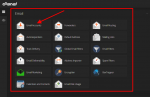
1. Now logon to your hosting admin panel and scroll down to Email Tab
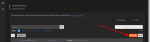
2. Click On Create
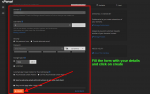
3. Fill in the form with your details and click on create
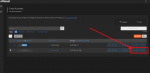
4. After Step 3 the page below will appear, Locate the new email account
you just created and click on CONNECT DEVICES next to it.
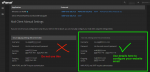
5. Details below are what we are going to use to configure our script
Email.
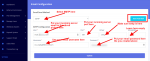
6. Login to your website admin panel and navigate to Email manager>>
Email configure. then configure it with the details in green box using your
own created email from your hosting panel.
After it, send test mail to your personal email addresses.
NOTE: If you configure it correctly, you'll get the test email in your inbox. check your spam folder too.
Meanwhile, it can't be in your normal inbox, it will be located in your spam folder.
To get the mail inyour normal mailbox do the last step here.
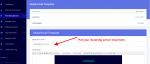
7. Go to website admin panel navigate to Email manager >> Global Template
and configure it like the picture below, save it and go back. send test email again and you'll have it in your primary inbox folder.
1. Now logon to your hosting admin panel and scroll down to Email Tab
2. Click On Create
3. Fill in the form with your details and click on create
4. After Step 3 the page below will appear, Locate the new email account
you just created and click on CONNECT DEVICES next to it.
5. Details below are what we are going to use to configure our script
Email.
6. Login to your website admin panel and navigate to Email manager>>
Email configure. then configure it with the details in green box using your
own created email from your hosting panel.
After it, send test mail to your personal email addresses.
NOTE: If you configure it correctly, you'll get the test email in your inbox. check your spam folder too.
Meanwhile, it can't be in your normal inbox, it will be located in your spam folder.
To get the mail inyour normal mailbox do the last step here.
7. Go to website admin panel navigate to Email manager >> Global Template
and configure it like the picture below, save it and go back. send test email again and you'll have it in your primary inbox folder.