


Ultimate POS - Best Advanced Stock Management, Point of Sale & Invoicing application v7.3 Nulled
No permission to download
- Thread starter Mrsam_1
- Start date
-
Welcome to Babiato! All resources are 100% clean and safe to use
📢 Join Our Official Telegram Channel For Updates
Bypass all resource restrictions, passwords, and keys? Read here!
You are using an out of date browser. It may not display this or other websites correctly.
You should upgrade or use an alternative browser.
You should upgrade or use an alternative browser.


ziate
Member
- Oct 30, 2022
- 39
- 20
- 8
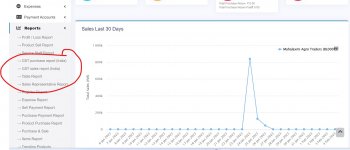
can tell my what is GST ?V4.8
ENABLE_GST_REPORT_INDIA=1
Enabled in .env
But GST reports not shows in pannel
Its tax imposed on Goods and Services hence GSTcan tell my what is GST ?

spookbook
New member
- Dec 14, 2018
- 14
- 15
- 3
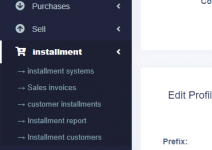
Ok this is installment module
Pls can you share this modulei have moduel installment


- Jul 19, 2018
- 68,461
- 67,996
- 120
What language are you looking for the invoice?hello has anyone managed to translate the invoice into another language because at home it's always in English
- Jul 19, 2018
- 68,461
- 67,996
- 120
What is usage of it?Anyone with the spreadsheet add-on kindly share

timwaweru
New member
- Oct 5, 2022
- 7
- 1
- 3
Storage of all spreadsheets in the system depending on the businessWhat is usage of it?
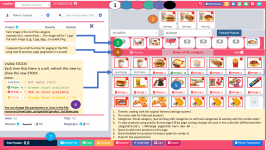
do we have to copy and replace the whole folders in the directory??Hi, i share this UI (Version 3 - UPOS480) for the POS (Works with Create & Edit sell), with visible stock and some optimizations.
Working for variations too
MAKE BACKUPS of yor root directory o application before install this!!!
To install:
1. Make a copy of your root directory ( the root of your application ...)
2. Unzip and copy the folders app, custom_views and resources in your root directory ( the root of your application ...)
3. Run the app -- I recommend test enviroment (localhost)
4. Change the theme form CFG-SYSTEM and test the default colors of the app
5. Clear cache or use CTRL + F5 to refresh the page, clear cache if its neccesary
Update: Images for categories
Each image is the id of the category,example id=1, name=fruits ... The image will be "1.jpg"
Put each image (1.jg, 2,jpg, 3jpg...) in public/img
The zip contains (If you want to make a copy of this files before replace.)
:: JS & CSS
\UPOS478\public\css\app.css"
\UPOS478\public\css\pos.js"
:: Headers
\UPOS478\resources\views\layouts\partials\header-pos.blade.php"
:: Controllers { SellPosController change line 1930 paginate(36) to MAX 40 } to replace scroll and use pagination
\app\Http\Controllers\SellPosController.php
:: Forms using customer_views
\UPOS478\resources\views\sale_pos\create.blade.php"
\UPOS478\resources\views\sale_pos\edit.blade.php"
\UPOS478\resources\views\sale_pos\product_row.blade.php"
\UPOS478\resources\views\sale_pos\partials\pos_form_totals.blade.php"
\UPOS478\resources\views\sale_pos\partials\pos_form.blade.php"
\UPOS478\resources\views\sale_pos\partials\pos_form_actions.blade.php"
\UPOS478\resources\views\sale_pos\partials\pos_sidebar.blade.php"
\UPOS478\resources\views\sale_pos\partials\product_list_box.blade.php"
\UPOS478\resources\views\sale_pos\partials\product_list.blade.php"
\UPOS478\resources\views\sale_pos\partials\featured_products.blade.php"
\UPOS478\resources\views\sale_pos\partials\pos_category_product.blade.php"
:: Language
\resources\lang\en\lang_v1.php
\resources\lang\es\lang_v1.php
Enjoy!!! And let me to know if it works!

barrydevelopers
Member
What's about this?

jocani19
Active member
- Jun 4, 2022
- 117
- 63
- 28
Hi, yes!do we have to copy and replace the whole folders in the directory??
But i recommend to make a backup of the entire root before.
- Jul 19, 2018
- 68,461
- 67,996
- 120
you may share it with the community.What's about this?
super merci frèreParamètres > Paramètres de facturation > Modèles de facture > Sélectionnez le modèle souhaité ou la valeur par défaut à modifier
puis changez les titres en français en tapant en français.

hackthegravity
Member
- Jul 25, 2019
- 57
- 14
- 8
can anyone share the demo database?In parent folder you can find file ".env" open it and then replace
"APP_ENV=local" to "APP_ENV=demo"

zeahouse
New member
- Sep 15, 2022
- 18
- 3
- 3

