


Wa Gateway | Multi device BETA | MPWA MD v10 ( Extended License )
No permission to download
- Thread starter X--MEN
- Start date
-
Welcome to Babiato! All resources are 100% clean and safe to use
📢 Join Our Official Telegram Channel For Updates
Bypass all resource restrictions, passwords, and keys? Read here!
You are using an out of date browser. It may not display this or other websites correctly.
You should upgrade or use an alternative browser.
You should upgrade or use an alternative browser.

bersuit72
Member
YOUURL/HOMEHola chico después de la instalación
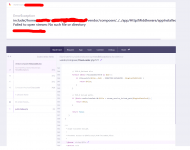
V4.2.1 MPWA MD Obtengo 500 página de error, por favor, cómo resolverlo


- Jul 19, 2018
- 68,316
- 67,954
- 120
- Jul 19, 2018
- 68,316
- 67,954
- 120

Argentino
Active member
- May 1, 2020
- 127
- 66
- 28
Please be specific in the messages, with a short message you do not help yourself and we can less help you.No give too
Check previous posts there you will find your solution.

- Jul 19, 2018
- 68,316
- 67,954
- 120
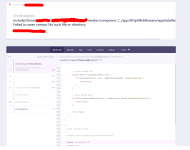
After installing version 4.2.1 the site sends me an ERROR 500 I checked the ENV file everything is OK I checked the DB everything is OK however when I display the error page here is the message that is View Capture posterPlease be specific in the messages, with a short message you do not help yourself and we can less help you.
Check previous posts there you will find your solution.
Attachments
Argentino
Active member
- May 1, 2020
- 127
- 66
- 28
After installing version 4.2.1 the site sends me an ERROR 500 I checked the ENV file everything is OK I checked the DB everything is OK however when I display the error page here is the message that is View Capture poster
Go back to version 4.1.1 and only change the following files from version 4.2.1
- app/model/Blast.php
-app/http/BlastController.php
- application/console/commands/cronjobs.php
Try destroy the node.js from before instal, then reinstal 4.2.1, then build node againAfter installing version 4.2.1 the site sends me an ERROR 500 I checked the ENV file everything is OK I checked the DB everything is OK however when I display the error page here is the message that is View Capture poster

Argentino
Active member
- May 1, 2020
- 127
- 66
- 28
Can you provide me with your script, I had a great idea to make it work with mp4 and mp3 from google drive.hello,
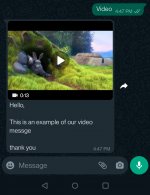
i am trying to add audio and video and zip files in the autoreply. i am stuck only at one point that i am unable to upload the audio/zip file i.e. mp3/zip file through the upload option in the file manager.
i am able to receive autoreply for mp3 file but i have to manually paste the mp3 file in files in public\storage\files\1
which resulted problem that audio file has no sound.
whereas, i am able to receive autoreply of MP4 absolutely perfectly.
my lfm.php
see if anyone has suggestions and i am missing anything
Code:<?php /* |-------------------------------------------------------------------------- | Documentation for this config : |-------------------------------------------------------------------------- | online => http://unisharp.github.io/laravel-filemanager/config | offline => vendor/unisharp/laravel-filemanager/docs/config.md */ return [ /* |-------------------------------------------------------------------------- | Routing |-------------------------------------------------------------------------- */ 'use_package_routes' => true, /* |-------------------------------------------------------------------------- | Shared folder / Private folder |-------------------------------------------------------------------------- | | If both options are set to false, then shared folder will be activated. | */ 'allow_private_folder' => true, // Flexible way to customize client folders accessibility // If you want to customize client folders, publish tag="lfm_handler" // Then you can rewrite userField function in App\Handler\ConfigHandler class // And set 'user_field' to App\Handler\ConfigHandler::class // Ex: The private folder of user will be named as the user id. 'private_folder_name' => UniSharp\LaravelFilemanager\Handlers\ConfigHandler::class, 'allow_shared_folder' => false, 'shared_folder_name' => 'shares', /* |-------------------------------------------------------------------------- | Folder Names |-------------------------------------------------------------------------- */ 'folder_categories' => [ 'file' => [ 'folder_name' => 'files', 'startup_view' => 'list', 'max_size' => 50000, // size in KB 'thumb' => true, 'thumb_width' => 80, 'thumb_height' => 80, 'valid_mime' => [ 'image/jpeg', 'image/pjpeg', 'image/png', 'video/mp4', 'audio/mp3', // 'image/gif', 'application/pdf', 'text/plain', 'application/zip', ], ], 'image' => [ 'folder_name' => 'photos', 'startup_view' => 'grid', 'max_size' => 50000, // size in KB 'thumb' => true, 'thumb_width' => 80, 'thumb_height' => 80, 'valid_mime' => [ 'image/jpeg', 'image/pjpeg', 'image/png', 'image/gif', 'video/mp4', 'audio/mp3', 'application/zip', ], ], ], /* |-------------------------------------------------------------------------- | Pagination |-------------------------------------------------------------------------- */ 'paginator' => [ 'perPage' => 30, ], /* |-------------------------------------------------------------------------- | Upload / Validation |-------------------------------------------------------------------------- */ 'disk' => 'public', 'rename_file' => true, 'rename_duplicates' => false, 'alphanumeric_filename' => false, 'alphanumeric_directory' => false, 'should_validate_size' => false, 'should_validate_mime' => true, // behavior on files with identical name // setting it to true cause old file replace with new one // setting it to false show `error-file-exist` error and stop upload 'over_write_on_duplicate' => false, // Item Columns 'item_columns' => ['name', 'url', 'time', 'icon', 'is_file', 'is_image', 'thumb_url'], /* |-------------------------------------------------------------------------- | Thumbnail |-------------------------------------------------------------------------- */ // If true, image thumbnails would be created during upload 'should_create_thumbnails' => true, 'thumb_folder_name' => 'thumbs', // Create thumbnails automatically only for listed types. 'raster_mimetypes' => [ 'image/jpeg', 'image/pjpeg', 'image/png', ], 'thumb_img_width' => 200, // px 'thumb_img_height' => 200, // px /* |-------------------------------------------------------------------------- | File Extension Information |-------------------------------------------------------------------------- */ 'file_type_array' => [ 'pdf' => 'Adobe Acrobat', 'doc' => 'Microsoft Word', 'docx' => 'Microsoft Word', 'xls' => 'Microsoft Excel', 'xlsx' => 'Microsoft Excel', //'gif' => 'GIF Image', 'jpg' => 'JPEG Image', 'jpeg' => 'JPEG Image', 'png' => 'PNG Image', //'ppt' => 'Microsoft PowerPoint', //'pptx' => 'Microsoft PowerPoint', 'mp4' => 'Video', 'mp3' => 'Audio', 'zip' => 'Archive', ], /* |-------------------------------------------------------------------------- | php.ini override |-------------------------------------------------------------------------- | | These values override your php.ini settings before uploading files | Set these to false to ingnore and apply your php.ini settings | | Please note that the 'upload_max_filesize' & 'post_max_size' | directives are not supported. */ 'php_ini_overrides' => [ 'memory_limit' => '256M', ], ];
It will be a big job but not impossible.

I have made several changes and currently i am stuck with file type not allowed error for mp3 and zip. I'll share once everything starts workingCan you provide me with your script, I had a great idea to make it work with mp4 and mp3 from google drive.
It will be a big job but not impossible.
Argentino
Active member
- May 1, 2020
- 127
- 66
- 28
I said make it work with google drive to avoid storage in our hosting. BUM BUMI have made several changes and currently i am stuck with file type not allowed error for mp3 and zip. I'll share once everything starts working
bersuit72
Member

douglassouza2022
Member

budak12
New member
- May 13, 2022
- 13
- 5
- 3

tpetualang
Active member
anyone who knows what the mean of this text :
"No arguments expected for "schedule:run" command, got "/dev/null"
my schedule message is not runing
"No arguments expected for "schedule:run" command, got "/dev/null"
my schedule message is not runing
kecoamumet
Member
- May 14, 2022
- 57
- 10
- 8
anyone who knows what the mean of this text :
"No arguments expected for "schedule:run" command, got "/dev/null"
my schedule message is not runing
maybe like this bro, if your are running aapanel
/www/server/php/74/bin/php /www/wwwroot/yourwampfolder/artisan schedule:run 1>> /dev/null 2>&1
tpetualang
Active member
thank you in advancemaybe like this bro, if your are running aapanel
/www/server/php/74/bin/php /www/wwwroot/yourwampfolder/artisan schedule:run 1>> /dev/null 2>&1
- Jul 19, 2018
- 68,316
- 67,954
- 120
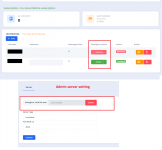
New Modification with Dialogflow Integration to interact with your own chatbot.
Check more details for dialogflow
Features:
1. This works with Autoreply if "Dialogflow Status" is active.
2. Active/Inactive button for individual device to interact with Dialogflow.
3. If "Dialogflow Status" is inactive then Autoreply works with default auto reply keywords.
3. Dialogflow JSON data add/delete option available in Admin server setting.
Note: This works with all users or devices only when Admin sets dialogflow settings with single agent.
If you have any idea please share.
Code will be shared after all testing.
Edit:
Source Code is available here
Check more details for dialogflow
Features:
1. This works with Autoreply if "Dialogflow Status" is active.
2. Active/Inactive button for individual device to interact with Dialogflow.
3. If "Dialogflow Status" is inactive then Autoreply works with default auto reply keywords.
3. Dialogflow JSON data add/delete option available in Admin server setting.
Note: This works with all users or devices only when Admin sets dialogflow settings with single agent.
If you have any idea please share.
Code will be shared after all testing.
Edit:
Source Code is available here
Last edited by a moderator:

