


Wordfence - WordPress Security Plugins v9.0.2
No permission to download
- Thread starter Mrsam_1
- Start date
-
Welcome to Babiato Forums!
📢 Join Babiato Official Telegram Channel For Updates
Bypass all resource restrictions, passwords, and keys? Read here!
You are using an out of date browser. It may not display this or other websites correctly.
You should upgrade or use an alternative browser.
You should upgrade or use an alternative browser.



flush27
Member
- Dec 10, 2019
- 23
- 39
- 18
Worked like a charm. Thank you!1. DeActivate Wordfence in your WP install
2. Go to your install folder /wordfence/lib/
3. Replace the file wordfenceClass.php there with the unzipped version of file wordfenceClass.php.zip attached on this post
4. Activate your copy of Wordfence —-> Premium
5. Dont forget to Say Cheers ... otherwise nothing will happen

Osvaldo0123
Active member
- Nov 13, 2020
- 110
- 39
- 28
is this a false positive?1. DeActivate Wordfence in your WP install
2. Go to your install folder /wordfence/lib/
3. Replace the file wordfenceClass.php there with the unzipped version of file wordfenceClass.php.zip attached on this post
4. Activate your copy of Wordfence —-> Premium
5. Dont forget to Say Cheers ... otherwise nothing will happen

is this a false positive?
Just try it out babes and report otherwise


I'm Done 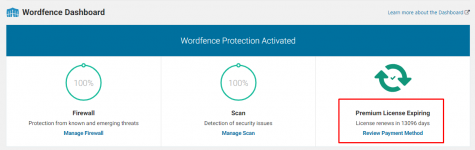
== Changelog ==
= 7.5.4 - June 7, 2021 =
* Fix: Resolve conflict with woocommerce-gateway-amazon-payments-advanced plugin

Not nulled....
is asking for a key, and if you type any one, it says it's not a valid key.
Try this : Might help

- Jul 19, 2018
- 69,965
- 68,531
- 120
Please Look at wordfenceClass.php in previous posts to Learn how to nulled it.Not nulled....
is asking for a key, and if you type any one, it says it's not a valid key.
Best practice : Read previous posts before ask help.

trueDeveloper
Member
- Oct 13, 2020
- 15
- 16
- 8

betti1965
Member
- Jul 26, 2019
- 53
- 13
- 8
Any new updates, please? The last update was in June...
trueDeveloper
Member
- Oct 13, 2020
- 15
- 16
- 8
1. DeActivate Wordfence in your WP install
2. Go to your install folder /wordfence/lib/
3. Replace the file wordfenceClass.php there with the unzipped version of file wordfenceClass.php.zip attached on this post
4. Activate your copy of Wordfence —-> Premium
5. Dont forget to Say Cheers ... otherwise nothing will happen

Thank you so much, It's working but is it safe to use?
Thank you so much, It's working but is it safe to use?
its in active use on all my sites & has zilch issues reported back even on my client sites.
Thank you so much, It's working but is it safe to use?

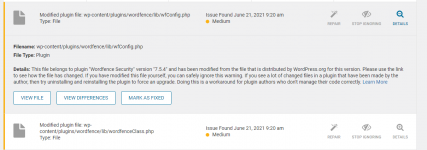
This error is reported because WF matches its lines of codes to WP's repository when scanning the site files. just overlook it and dont run REPAIR otherwise you'd loose the premium features.
trueDeveloper
Member
- Oct 13, 2020
- 15
- 16
- 8
I press "ignore"
This error is reported because WF matches its lines of codes to WP's repository when scanning the site files. just overlook it and dont run REPAIR otherwise you'd loose the premium features.
I press "ignore"
And continue to set it to IGNORE for as long you wish to enjoy the premium features.
trueDeveloper
Member
- Oct 13, 2020
- 15
- 16
- 8
Thanks for the gentle reminderAnd continue to set it to IGNORE for as long you wish to enjoy the premium features.


rmo07
New member
- Jan 27, 2021
- 0
- 0
- 1
Working! Thank You!1. Desative o Wordfence em sua instalação WP
2. Vá para a pasta de instalação / wordfence / lib /
3. Substitua o arquivo wordfenceClass.php pela versão descompactada do arquivo wordfenceClass.php.zip anexado a esta postagem
4. Ative sua cópia do Wordfence —-> Premium
5. Não se esqueça de dizer felicidades ... caso contrário, nada acontecerá : p

Supremo DM
Active member
This Approach has break my website, now I can't access the Website! I can't deactivate wordfence plugin via FTP or with wp plugin deactivate --all (Aws Lightsail Bitnami WordPress Command) I'm stuck now!1. DeActivate Wordfence in your WP install
2. Go to your install folder /wordfence/lib/
3. Replace the file wordfenceClass.php there with the unzipped version of file wordfenceClass.php.zip attached on this post
4. Activate your copy of Wordfence —-> Premium
5. Dont forget to Say Cheers ... otherwise nothing will happen


