WP Rocket - Best WordPress Caching Plugin

WP Rocket - Best WordPress Caching Plugin v3.23.3.3 Nulled

No permission to download

Mrsam_1

Well-known member
Administrative
Trusted Seller
Jul 19, 2018
69,436
68,368
120

Mrsam_1

Well-known member
Administrative
Trusted Seller
Jul 19, 2018
69,436
68,368
120

volovenk

New member
Jul 4, 2026
6
0
1
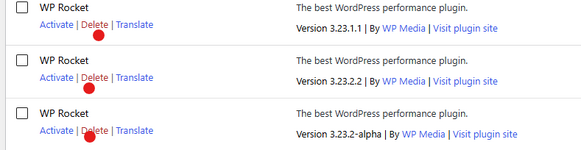
Hello, how can I delete the old versions of your plugins, they are somehow cloned with new versions and then it is impossible to delete them. I also cannot deactivate WP Rocket version 3.23.3.2 now. There isn't even a confirmation pop-up window, and without deactivation, the new version won't install—it results in a "critical error. /wp-content/plugins/wp-rocket-3.23.3.3/wp-rocket.php on line 220"Знімок екрана 2026-08-29 012445.png6-08-29 012548.png
 
Last edited:

Minion01

Well-known member
Babiato Fan
Babiato Lover
Null Master
Trusted Seller
Trusted Uploader
Aug 3, 2018
7,485
6,795
120
Hello, how can I delete the old versions of your plugins, they are somehow cloned with new versions and then it is impossible to delete them. I also cannot deactivate WP Rocket version 3.23.3.2 now. There isn't even a confirmation pop-up window, and without deactivation, the new version won't install—it results in a "critical error. /wp-content/plugins/wp-rocket-3.23.3.3/wp-rocket.php on line 220"Знімок екрана 2026-08-29 012445.png6-08-29 012548.png
It's because of the name. Delete them from your file manager and then when you download wp rocket new versoon remove the version and then upload it in your wordpress.
 
  • Love
Reactions: PzSniper

About us

  • Babiato Forum - The webmaster community has been around for many years and pride ourselves on offering unbiased, critical discussion among people of all different backgrounds. We are working every day, updating Daily resource to make sure our community is one of the best.

Quick Navigation

User Menu