Sobi
Member
- Dec 4, 2019
- 37
- 5
- 8
This Message is Showing in new version of 3.11.4Your WP Rocket license is expired!

Bypass all resource restrictions, passwords, and keys? Read here!
This Message is Showing in new version of 3.11.4Your WP Rocket license is expired!

There are a lot of changes in the new release of the plugin 3.11.4,Test the new version and if needed, we will reupload with the css fix as before.


1. clear cache with Wp-Rocketunused css in latest version also doesn't work...
Is there any chance of fixing this or is it definitely necessary to look for alternative plugins?
I already did it. Everything seems to be fine in the plugin interface (a message appears that the generation of the used css is done for the home page and will be done for the rest). BUT!1. clear cache with Wp-Rocket
2. deactivate the plugin
3. upload the new plugin
Carefully read the recommendationsI already did it. Everything seems to be fine in the plugin interface (a message appears that the generation of the used css is done for the home page and will be done for the rest). BUT!
The /wp-content/cache/used-css/1 folder is EMPTY! In fact, no files are created. And the pagespeed also shows an error...
Something is not working...
Thanks, I'll read it.Carefully read the recommendations
of the WP Rocket developers and see what problems you have on the site.
To begin with, here are two links for you:
1. https://docs.wp-rocket.me/article/46-how-to-check-if-wp-rocket-is-caching-your-pages
2. https://docs.wp-rocket.me/article/99-pages-not-cached-or-minify-cssjs-not-working

There are a lot of changes in the new release of the plugin 3.11.4,
but API requests remained.


This is a false alarm of the Ukrainian

Trojan Dropper.Bomgen.VBS.1 is a Virus Total false positive, based on the metrics in the activation lines. If you do not agree to this, please do not download the product or purchase the product directly from the author.
Your words speak for itself.This is a false alarm of the Ukrainian
antivirus Zillya (translated into English - Potion).
The name speaks for itself.
This has already been discussed - read the previous comments.


I read the manuals, but the problem with removing unused css could not be solved. The wp-content/cache/used-css/1 directory is still empty.Thanks, I'll read it.
Although earlier (with previous versions before 3.11.3 the appearance of requests for API) there were no problems with unused css.
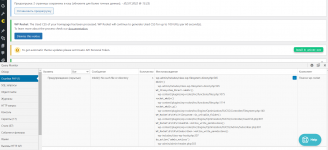
Install the Query Monitor plugin and see what errors there are. Provide a screenshot.I read the manuals, but the problem with removing unused css could not be solved. The wp-content/cache/used-css/1 directory is still empty.
At the same time, all other functions work fine: the page cache is created, minification works. If you switch to creating critical css - it also works.
Tried disabling Wordfence and Cloudflare. Did not help.
The only thing I see in the site access logs is error 499 (/wp-admin/admin-ajax.php?action=as_async_request_queue_runner&nonce=e5639783ae HTTP/1.0" 499)
Maybe someone knows how to solve the problem?
 drive.google.com
There are no API calls at all.Install the Query Monitor plugin and see what errors there are. Provide a screenshot.
You can try my version of the WP Rocket plugin:
wp-rocket.zip

Yeah. I will check it deeply.There are no API calls at all.
And the error is on the screen
Ok, thanks.Yeah. I will check it deeply.
That's right, if you installed my plugin, there will be no unnecessary requests. Now deactivate Query Monitor and check the operation of the site and the plugin. Delete the cache and create it again. Check if caching is working.There are no API calls at all.
And the error is on the screen