


Ask OP @CyberDeviLQ where i download update only ? i have 2.2.4 nulledbut i want update 2.2.5 from here but i dont see

XenForo CMS - forum platform v2.3.13 Nulled
No permission to download
- Thread starter Mrsam_1
- Start date
-
Welcome to Babiato Forums!
📢 Join Babiato Official Telegram Channel For Updates
Bypass all resource restrictions, passwords, and keys? Read here!
You are using an out of date browser. It may not display this or other websites correctly.
You should upgrade or use an alternative browser.
You should upgrade or use an alternative browser.

I have no idea how to null, sorryYou can also share as I can see you've purchased XF
I'm bit busy these days .


- Jul 19, 2018
- 70,383
- 68,611
- 120
You can try this method.I have no idea how to null, sorry
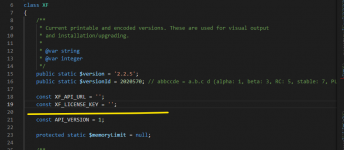
go to src/XF.php then remove XF_API_URL and XF_License_KEY.
I don't think so.You can try this method.
go to src/XF.php then remove XF_API_URL and XF_License_KEY.

- May 24, 2018
- 79,074
- 112,422
- 120
CyberDeviL updated Xenforo v2.2.5 Nulled Full with a new update entry:
XenForo v2.2.5 Final
Read the rest of this update entry...
XenForo v2.2.5 Final
XenForo 2.2.5 is now available for all licensed customers to download. We strongly recommend that all customers running previous versions of XenForo 2.2 upgrade to this release to benefit from increased stability.
This release changes the default CAPTCHA method from reCAPTCHA to hCaptcha. If you were using the default CAPTCHA settings, you will automatically be switched over to hCaptcha. If you provided your own reCAPTCHA keys or chose a different CAPTCHA method, your existing CAPTCHA...
Read the rest of this update entry...
For those who are already having XenForo earlier version installed & just want to upgrade to current release (ex: v2.1.3 to v2.1.4) follow the instructions:
- XenForo Upgrade package doesn't contain "data" + "internal_data" folder and ".htaccess" file in the parent directory.
- So either you can remove those folders, file & then upload . . . or, if you haven't changed anything in ".htaccess" file, then simply download & upload the whole package, it won't affect any existing data.
PLEASE FOLLOW THE SAME UPGRADE PROCESS FOR XENFORO UPGRADES . . .
What's the difference between the different 2.2.5 uploads?
One is with XenForo copyright branding, another one is without copyright branding .

Nabeel
Active member
i don't have branding copyrights, how can i add and where? tyOne is with XenForo copyright branding, another one is without copyright branding .
- Jul 19, 2018
- 70,383
- 68,611
- 120
i don't have branding copyrights, how can i add and where? ty
Hi, @adam12x
If you want to back XenForo official Copyright text and add your custom Copyright text. you need follow this method.
Restore or add Xenforo Copyright Branding:
Step 1: Download XenForo With copyright branding Here:
Step 2: Then Re-install XenForo with official installation method.
If you want to add Custom Copyright Branding:
Step 1 : Login admin panel.
Step 2: Go to Appearance/Languages then phrases Select phrase
Step 3: In Search bar, search
extra_copyright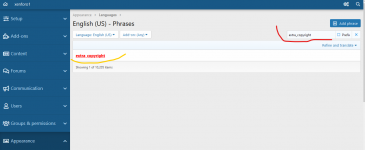
Step 4: Write your text in Phrase text box:
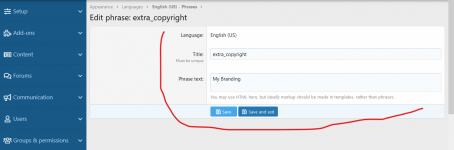
Step: After writing, click save.
Done.
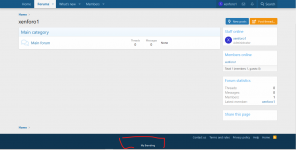
More: you can add custom HTML to make footer better.

fdsghd
New member
- Dec 6, 2019
- 4
- 1
- 3
You can't wake a person who is pretending to be asleep.You can try this method.
go to src/XF.php then remove XF_API_URL and XF_License_KEY.
XF 2.2.6 and other resources will be updated tomorrow .
Please try not to ruin this thread by sharing your third-party downloaded stuffs .
Please try not to ruin this thread by sharing your third-party downloaded stuffs .
2.2.6.1 releasedXF 2.2.6 and other resources will be updated tomorrow .
Please try not to ruin this thread by sharing your third-party downloaded stuffs .

No seas sapo
New member
- May 13, 2022
- 0
- 0
- 0
A
Auwal
Guest
LATEST XENFORO RESOURCES WILL BE UPDATED ONCE @Tomz COMPLLETES THE XENFORO SUPPORT POLICY SETUP SOON .
XenForo Policy Setup?
