GoGrocer - Grocery Vegetable Store Delivery Mobile App with Admin Panel By Tecmanic

GoGrocer - Grocery Vegetable Store Delivery Mobile App with Admin Panel By Tecmanic v1.14.1

No permission to download
  • Welcome to Babiato Forum! All Resources are 100% clean and Safe to Use

anh2cn

New member
Oct 25, 2019
8
0
1
A problem occurred configuring project ’:flutter_launch’. > The Android Gradle plugin supports only Kotlin Gradle plugin version 1.3.10 and higher. The following dependencies do not satisfy the required version: project ’:flutter_launch’ -> org.jetbrains.kotlin:kotlin-gradle-plugin:1.2.71

in app

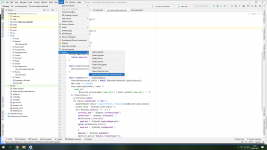
Step1: Open project via Androidstudio =>Tool => Flutter => Open for editting in Android Studio
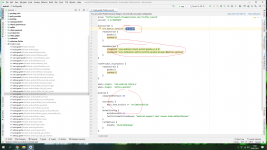
Step2: See Gradle Scripts in left menu => select Build.Gradle (Module:Androi.flutter_launch)
and change ext.kotlin_version to 1.4.32
save and run
if error flutter_barcode_scanner, strip then see in attach ducument
 

Attachments

  • 1.png
    1.png
    229.5 KB · Views: 40
  • 2.png
    2.png
    331.5 KB · Views: 38
  • COMMON ERROR RESOLUTION.pdf
    1.4 MB · Views: 27

Baljeet042

Active member
Aug 1, 2020
147
26
28
india
Step1: Open project via Androidstudio =>Tool => Flutter => Open for editting in Android Studio
Step2: See Gradle Scripts in left menu => select Build.Gradle (Module:Androi.flutter_launch)
and change ext.kotlin_version to 1.4.32
save and run
if error flutter_barcode_scanner, strip then see in attach ducument
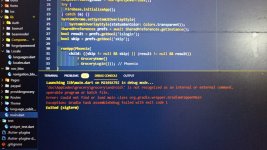
'doc\AppCodes\grocery\android\' is not recognized as an internal or external command,
operable program or batch file.


Error: Could not find or load main class org.gradle.wrapper.GradleWrapperMain
Caused by: java.lang.ClassNotFoundException: org.gradle.wrapper.GradleWrapperMain
 

anh2cn

New member
Oct 25, 2019
8
0
1
'doc\AppCodes\grocery\android\' is not recognized as an internal or external command,
operable program or batch file.


Error: Could not find or load main class org.gradle.wrapper.GradleWrapperMain
Caused by: java.lang.ClassNotFoundException: org.gradle.wrapper.GradleWrapperMain
this is not error of code grocery. check again setup androi studio
 

White Devil

Well-known member
Trusted Seller
Trusted Uploader
Banned User
Jan 6, 2019
3,096
6,116
120
world
babiato.tech
Step1: Open project via Androidstudio =>Tool => Flutter => Open for editting in Android Studio
Step2: See Gradle Scripts in left menu => select Build.Gradle (Module:Androi.flutter_launch)
and change ext.kotlin_version to 1.4.32
save and run
if error flutter_barcode_scanner, strip then see in attach ducument
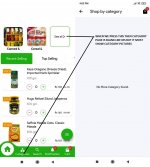
another issue bro
android build sucessfull

even i have added products and category too its also displaying
but in fotter of app there is home l categories
when i press that categories its not displaying any thing
 

anh2cn

New member
Oct 25, 2019
8
0
1
another issue bro
android build sucessfull

even i have added products and category too its also displaying
but in fotter of app there is home l categories
when i press that categories its not displaying any thing
May be not display at your area location. Check lat and long of marker and your location. Or show error by picture
 

Davinchi

Member
Babiato Lover
Dec 22, 2020
67
39
18
another issue bro
android build sucessfull

even i have added products and category too its also displaying
but in fotter of app there is home l categories
when i press that categories its not displaying any
how many categories did you added bro
 

iamanoob

Active member
May 28, 2020
405
127
43
Any developer who worked on it before and who can make my application live without errors, can contact me

Come to chat
 

About us

  • Babiato Forum - The webmaster community has been around for many years and pride ourselves on offering unbiased, critical discussion among people of all different backgrounds. We are working every day, updating Daily resource to make sure our community is one of the best.

Quick Navigation

User Menu