india220
Active member
VortexPanel v3 — Free, Open-Source Server Control Panel (aaPanel/HestiaCP Alternative)
Repo: https://github.com/BrowserlessAPI/VortexPanelLicense: MITStack: Python 3 + Flask backend, Alpine.js 3.14 frontend (no heavy JS framework), Gunicorn in productionStatus: Actively developed, fresh v3 release — feedback and bug reports very welcome
What is VortexPanel?
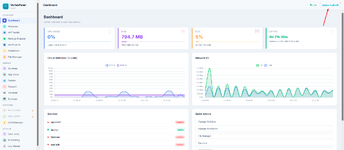
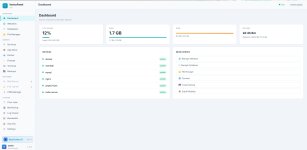
VortexPanel is an open-source server management panel for Linux VPS/dedicated servers — think aaPanel or HestiaCP, but built from scratch with a modern Python/Flask backend and a fast, lightweight Alpine.js UI (no Vue/React build step, no bloat). It's aimed at developers and small hosting operators who want full control over their stack without paying for "Pro" tiers to unlock basic security and ops tooling.Install takes about 2–3 minutes on a fresh VPS and gives you a full LEMP/LAMP-style management panel at http://your-server-ip:8888.
Quick Install
Code:
wget -O install.sh https://raw.githubusercontent.com/BrowserlessAPI/VortexPanel/main/install.sh && bash install.shThe installer auto-detects your OS and package manager (apt or dnf) and sets everything up as a systemd service (vortexpanel), running under Gunicorn (4 workers × 4 threads) on port 8888. On RHEL 8-family systems (where the default Python is 3.6), it automatically installs Python 3.11 for the panel's own virtual environment.
Supported Operating Systems
- Ubuntu 20.04 / 22.04 / 24.04
- Debian 11 / 12
- AlmaLinux 8 / 9 / 10
- Rocky Linux 8 / 9 / 10
- RHEL 8 / 9 / 10
- Oracle Linux 8 / 9
- CentOS Stream
- CloudLinux 8 / 9 / 10
- Fedora 38+
Minimum requirements: 512 MB RAM (1 GB recommended), 2 GB free disk.
Core Features
Website Management
- Create/manage websites on Nginx, Apache2, OpenLiteSpeed, or Caddy
- One-click SSL via Let's Encrypt, with automatic Cloudflare DNS-01 vs HTTP-01 detection — if your domain is proxied through Cloudflare, it issues via DNS challenge automatically instead of failing on HTTP-01
- Reverse proxy configuration, custom Nginx/Apache directives
- Per-site security settings, domain aliases, deployment helpers
- One-click app deploys (WordPress and others) with automatic file ownership fixes
- Composer integration with framework presets (Laravel, Symfony, Yii2, CodeIgniter 4)
- File integrity / config snapshot tooling
PHP
- Multiple PHP versions installed side-by-side (7.4 through 8.5), each managed independently via PHP-FPM
- Per-site PHP version selection, php.ini editor, extension management, FPM pool control
- Automatic alignment of PHP-FPM socket permissions with your nginx user (prevents the classic "502 Bad Gateway: permission denied on socket" issue when nginx doesn't run as the distro-default user)
Databases
- MySQL / MariaDB / PostgreSQL / MongoDB — create databases, users, grants
- Multi-engine support detected automatically based on what's installed
- Export/import, phpMyAdmin integration (auto-configured on its own port, separate from your site's PHP versions)
File Manager
- Full file browser/editor with chmod, ownership, drag-and-drop upload
- Archive support: zip (including AES-encrypted zips via automatic 7z fallback), tar.gz/bz2/xz, 7z, rar
- Built-in search, in-browser code editor
- ClamAV integration for on-demand malware scanning
Security
- Firewall — full UFW support (Debian/Ubuntu) and firewalld support (Fedora/RHEL-family), both managed from the same UI: add/remove rules (TCP and UDP — many panels silently break UDP rules), enable/disable, and one-click presets (webserver, mail server, database)
- Fail2ban — intrusion prevention / brute-force protection, install and manage from the App Store
- ModSecurity WAF — Nginx web application firewall, install and toggle from the panel
- Security Score — at-a-glance audit of firewall status, fail2ban, SSH config, automatic updates, etc.
- SSH hardening helpers
- Nginx Load Balancer — round-robin / least-conn / IP-hash upstream balancing across multiple backend servers, configured entirely through the UI with automatic config validation (changes are tested with nginx -t before being applied, and rolled back automatically if invalid — your nginx never gets a broken config from this)
App Store
One-click install/uninstall for: Nginx, Apache2, OpenLiteSpeed, Caddy, MySQL, MariaDB, PostgreSQL, MongoDB, PHP (multi-version), Pure-FTPd, phpMyAdmin, Fail2ban, ClamAV, ModSecurity, DDNS Manager (built-in), BIND9 DNS, Node.js, Python, Docker, Composer, Redis, Supervisor, Roundcube webmail, CDN Manager, and more — with automatic conflict detection between mutually-exclusive software (e.g. can't run two web servers on the same ports without warning).DNS
- BIND9 authoritative DNS server management — zones, records, all from the UI
- DDNS Manager (built-in) — automatic IP update via Cloudflare API for dynamic-IP servers
Mail
- Postfix + Dovecot mail server management — domains, mailboxes, accounts
- Roundcube webmail, installable from the App Store with its own PHP-FPM version selector
Networking & CDN
- CDN Manager — Cloudflare, BunnyCDN, and others, with API-based cache purge / config
- Bandwidth monitoring via vnstat, per-domain traffic breakdown
Containers
- Docker management UI — containers, images, with a 40+ image quick-deploy catalog
Ops & Maintenance
- Cron Jobs — visual scheduler with 10 task types, run-now, logs
- Backups — website + database backups, restore, manual upload, and cloud backup to S3-compatible storage
- Real-time monitoring — CPU/RAM/disk, process list, service status
- Log Viewer — tail nginx/apache/system logs from the UI
- Web-based Terminal — full PTY shell access over WebSocket, no separate SSH client needed
- AI Assistant tab — optional, connects to an OpenAI-compatible API (e.g. NeonCodex, OpenAI, etc.) for in-panel server help
What VortexPanel gives you free that aaPanel charges for
aaPanel's free tier is solid, but several genuinely useful features are locked behind their paid "Professional" add-on. In VortexPanel, the equivalents are built in and free:| Feature | aaPanel Free | aaPanel Pro | VortexPanel |
|---|---|---|---|
| Nginx/Apache WAF |  |  (paid) (paid) | Free (ModSecurity) |
| Anti-intrusion / brute-force protection | | (paid) | Free (Fail2ban) |
| Load Balancer | | (paid) | Free (Nginx upstream LB) |
| Multi-distro firewall (UFW and firewalld) | partial | — | Free |
| Multi-version PHP, side-by-side | | — | |
| Cloud backup (S3) | — | varies | Free |
We're not claiming feature-parity with aaPanel Pro across the board (their analytics suite and multi-server orchestration tools are more mature) — but for the security and ops fundamentals, you shouldn't have to pay extra.
Why a new panel?
aaPanel and similar panels are great, but: heavier stacks, Pro features behind paywalls for things that should arguably be table stakes (a firewall UI, fail2ban, a WAF), and in some cases inconsistent multi-distro support. VortexPanel started as a personal project to scratch those itches and has grown into a full panel — Python/Flask was chosen specifically for a fast install (~2-3 minutes), low memory footprint, and a codebase that's approachable for contributors.Roadmap / Coming Soon
- Per-site website analytics (traffic, top URIs, status codes, bot detection — parsed from access logs)
- Resource/SSL-expiry alerting (Telegram/Discord/email/webhook)
- One-click security hardening actions (extending the existing Security Score)
- Disk usage analyzer (find what's eating your disk)
- Multi-user / role-based access control
- PHP webshell scanner (pattern-based, integrates with the File Manager)
- Load balancer node health checks + TCP/stream load balancing
Feedback Wanted
This is a fresh release and we're especially looking for testers on RHEL-family distros (AlmaLinux, Rocky, Fedora, Oracle Linux, CentOS Stream, CloudLinux) — the Debian/Ubuntu path has had the most real-world mileage so far. If you hit anything, please open an issue on GitHub with your distro/version and what you were doing.GitHub: https://github.com/BrowserlessAPI/VortexPanelLicense: MIT — free for personal and commercial use




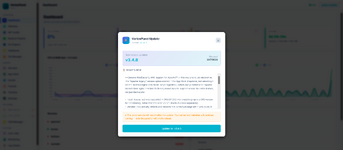
 Go Projects & Node.js Projects — New Deployment Managers
 Website Import Wizard — Migrate from cPanel, aaPanel, HestiaCP
 App Store — 2 New Modules
 UI System — Modal & Layout Fixes
 Smaller Fixes