VortexPanel - A New Enterprise Server Control Panel

india220

Active member
Feb 7, 2019
229
98
28
60mbanime.com

VortexPanel v3 — Free, Open-Source Server Control Panel (aaPanel/HestiaCP Alternative)
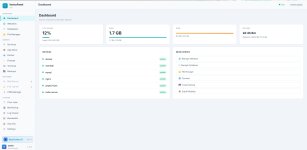

Screenshot 2026-06-15 114356.jpg
Repo: https://github.com/BrowserlessAPI/VortexPanelLicense: MITStack: Python 3 + Flask backend, Alpine.js 3.14 frontend (no heavy JS framework), Gunicorn in productionStatus: Actively developed, fresh v3 release — feedback and bug reports very welcome


What is VortexPanel?​

VortexPanel is an open-source server management panel for Linux VPS/dedicated servers — think aaPanel or HestiaCP, but built from scratch with a modern Python/Flask backend and a fast, lightweight Alpine.js UI (no Vue/React build step, no bloat). It's aimed at developers and small hosting operators who want full control over their stack without paying for "Pro" tiers to unlock basic security and ops tooling.


Install takes about 2–3 minutes on a fresh VPS and gives you a full LEMP/LAMP-style management panel at http://your-server-ip:8888.


Quick Install​

Code:
wget -O install.sh https://raw.githubusercontent.com/BrowserlessAPI/VortexPanel/main/install.sh && bash install.sh


The installer auto-detects your OS and package manager (apt or dnf) and sets everything up as a systemd service (vortexpanel), running under Gunicorn (4 workers × 4 threads) on port 8888. On RHEL 8-family systems (where the default Python is 3.6), it automatically installs Python 3.11 for the panel's own virtual environment.


Supported Operating Systems​

  • Ubuntu 20.04 / 22.04 / 24.04
  • Debian 11 / 12
  • AlmaLinux 8 / 9 / 10
  • Rocky Linux 8 / 9 / 10
  • RHEL 8 / 9 / 10
  • Oracle Linux 8 / 9
  • CentOS Stream
  • CloudLinux 8 / 9 / 10
  • Fedora 38+

Minimum requirements: 512 MB RAM (1 GB recommended), 2 GB free disk.


Core Features​


Website Management​

  • Create/manage websites on Nginx, Apache2, OpenLiteSpeed, or Caddy
  • One-click SSL via Let's Encrypt, with automatic Cloudflare DNS-01 vs HTTP-01 detection — if your domain is proxied through Cloudflare, it issues via DNS challenge automatically instead of failing on HTTP-01
  • Reverse proxy configuration, custom Nginx/Apache directives
  • Per-site security settings, domain aliases, deployment helpers
  • One-click app deploys (WordPress and others) with automatic file ownership fixes
  • Composer integration with framework presets (Laravel, Symfony, Yii2, CodeIgniter 4)
  • File integrity / config snapshot tooling

PHP​

  • Multiple PHP versions installed side-by-side (7.4 through 8.5), each managed independently via PHP-FPM
  • Per-site PHP version selection, php.ini editor, extension management, FPM pool control
  • Automatic alignment of PHP-FPM socket permissions with your nginx user (prevents the classic "502 Bad Gateway: permission denied on socket" issue when nginx doesn't run as the distro-default user)

Databases​

  • MySQL / MariaDB / PostgreSQL / MongoDB — create databases, users, grants
  • Multi-engine support detected automatically based on what's installed
  • Export/import, phpMyAdmin integration (auto-configured on its own port, separate from your site's PHP versions)

File Manager​

  • Full file browser/editor with chmod, ownership, drag-and-drop upload
  • Archive support: zip (including AES-encrypted zips via automatic 7z fallback), tar.gz/bz2/xz, 7z, rar
  • Built-in search, in-browser code editor
  • ClamAV integration for on-demand malware scanning

Security​

  • Firewall — full UFW support (Debian/Ubuntu) and firewalld support (Fedora/RHEL-family), both managed from the same UI: add/remove rules (TCP and UDP — many panels silently break UDP rules), enable/disable, and one-click presets (webserver, mail server, database)
  • Fail2ban — intrusion prevention / brute-force protection, install and manage from the App Store
  • ModSecurity WAF — Nginx web application firewall, install and toggle from the panel
  • Security Score — at-a-glance audit of firewall status, fail2ban, SSH config, automatic updates, etc.
  • SSH hardening helpers
  • Nginx Load Balancer — round-robin / least-conn / IP-hash upstream balancing across multiple backend servers, configured entirely through the UI with automatic config validation (changes are tested with nginx -t before being applied, and rolled back automatically if invalid — your nginx never gets a broken config from this)

App Store​

One-click install/uninstall for: Nginx, Apache2, OpenLiteSpeed, Caddy, MySQL, MariaDB, PostgreSQL, MongoDB, PHP (multi-version), Pure-FTPd, phpMyAdmin, Fail2ban, ClamAV, ModSecurity, DDNS Manager (built-in), BIND9 DNS, Node.js, Python, Docker, Composer, Redis, Supervisor, Roundcube webmail, CDN Manager, and more — with automatic conflict detection between mutually-exclusive software (e.g. can't run two web servers on the same ports without warning).


DNS​

  • BIND9 authoritative DNS server management — zones, records, all from the UI
  • DDNS Manager (built-in) — automatic IP update via Cloudflare API for dynamic-IP servers

Mail​

  • Postfix + Dovecot mail server management — domains, mailboxes, accounts
  • Roundcube webmail, installable from the App Store with its own PHP-FPM version selector

Networking & CDN​

  • CDN Manager — Cloudflare, BunnyCDN, and others, with API-based cache purge / config
  • Bandwidth monitoring via vnstat, per-domain traffic breakdown

Containers​

  • Docker management UI — containers, images, with a 40+ image quick-deploy catalog

Ops & Maintenance​

  • Cron Jobs — visual scheduler with 10 task types, run-now, logs
  • Backups — website + database backups, restore, manual upload, and cloud backup to S3-compatible storage
  • Real-time monitoring — CPU/RAM/disk, process list, service status
  • Log Viewer — tail nginx/apache/system logs from the UI
  • Web-based Terminal — full PTY shell access over WebSocket, no separate SSH client needed
  • AI Assistant tab — optional, connects to an OpenAI-compatible API (e.g. NeonCodex, OpenAI, etc.) for in-panel server help


What VortexPanel gives you free that aaPanel charges for​

aaPanel's free tier is solid, but several genuinely useful features are locked behind their paid "Professional" add-on. In VortexPanel, the equivalents are built in and free:


FeatureaaPanel FreeaaPanel ProVortexPanel
Nginx/Apache WAF❌✅ (paid)✅ Free (ModSecurity)
Anti-intrusion / brute-force protection❌✅ (paid)✅ Free (Fail2ban)
Load Balancer❌✅ (paid)✅ Free (Nginx upstream LB)
Multi-distro firewall (UFW and firewalld)partial✅ Free
Multi-version PHP, side-by-side✅✅
Cloud backup (S3)varies✅ Free

We're not claiming feature-parity with aaPanel Pro across the board (their analytics suite and multi-server orchestration tools are more mature) — but for the security and ops fundamentals, you shouldn't have to pay extra.


Why a new panel?​

aaPanel and similar panels are great, but: heavier stacks, Pro features behind paywalls for things that should arguably be table stakes (a firewall UI, fail2ban, a WAF), and in some cases inconsistent multi-distro support. VortexPanel started as a personal project to scratch those itches and has grown into a full panel — Python/Flask was chosen specifically for a fast install (~2-3 minutes), low memory footprint, and a codebase that's approachable for contributors.


Roadmap / Coming Soon​

  • Per-site website analytics (traffic, top URIs, status codes, bot detection — parsed from access logs)
  • Resource/SSL-expiry alerting (Telegram/Discord/email/webhook)
  • One-click security hardening actions (extending the existing Security Score)
  • Disk usage analyzer (find what's eating your disk)
  • Multi-user / role-based access control
  • PHP webshell scanner (pattern-based, integrates with the File Manager)
  • Load balancer node health checks + TCP/stream load balancing


Feedback Wanted​

This is a fresh release and we're especially looking for testers on RHEL-family distros (AlmaLinux, Rocky, Fedora, Oracle Linux, CentOS Stream, CloudLinux) — the Debian/Ubuntu path has had the most real-world mileage so far. If you hit anything, please open an issue on GitHub with your distro/version and what you were doing.


GitHub: https://github.com/BrowserlessAPI/VortexPanelLicense: MIT — free for personal and commercial use
 
  • Love
  • Like
Reactions: Minion01 and #Logan

Minion01

Well-known member
Babiato Fan
Babiato Lover
Null Master
Trusted Seller
Trusted Uploader
Feb 27, 2019
5,032
4,163
120
Interesting, let's try.
 

india220

Active member
Feb 7, 2019
229
98
28
60mbanime.com
Now we support Node.js Project and Go Project. Kindly test it fully, if any bug or any error or any function missing/not working. Let me know. So, i can inform my team to work on it.
 

india220

Active member
Feb 7, 2019
229
98
28
60mbanime.com
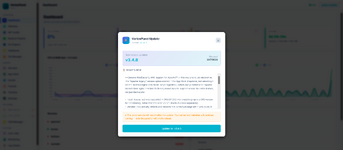
# VortexPanel v3.4.0 — Go/Node.js Project Manager, FFmpeg & Memcached, Website Import, Nine-Distro Reliability
**Release date:** July 2026
The biggest release since v3.2.0's security overhaul. Two entirely new deployment managers (Go and Node.js binary/app hosting — something none of cPanel, Plesk, aaPanel, or HestiaCP offer out of the box), a full Website Import wizard for migrating off other panels, two new App Store modules, and a broad reliability pass across all nine supported distros and both x86_64/arm64 architectures.
---
## 🚀 Go Projects & Node.js Projects — New Deployment Managers
VortexPanel can now host compiled Go binaries and Node.js applications directly, with the same one-click simplicity as a WordPress install.
### Go Projects
- **Binary-only deployment** — point at a compiled Go binary, VortexPanel handles the rest
- **Go SDK manager** — install/switch between multiple Go versions side by side, GOPROXY configuration (official/goproxy.io/goproxy.cn/direct)
- **systemd service** — auto-restart on crash, enable-on-boot, journal logging
- **Reverse proxy on all 4 webservers** — nginx, Apache, OpenLiteSpeed, and Caddy, auto-detected
- **WebSocket support** — proper `Upgrade`/`Connection` header handling on nginx and Apache (needed for `gorilla/websocket`, gRPC-Web, etc.) — the shared nginx `$connection_upgrade` map is written once and reused across every proxied project
- **Let's Encrypt SSL per domain** — nginx/Apache use certbot's native plugin, OpenLiteSpeed uses `certonly` + manual vhost wiring, Caddy is detected as already-automatic (no action needed)
- **Resource limits** — `MemoryMax` / `CPUQuota` in the systemd unit, so a runaway process gets capped instead of taking down the whole server
- **On-demand health checks** — real TCP connect to the app's port, catching the case `Restart=always` can't: a hung process still holding the port open
- **Binary version history + rollback** — every start/restart snapshots the binary (skipped if unchanged, via SHA-256 hash), keeps the last 5 versions, one-click revert
- Firewall integration (UFW + firewalld), all 9 supported distros
### Node.js Projects
- **PM2 + systemd** — choose either process manager per project
- **nvm-based version switching** — install and switch Node versions without affecting other projects
- Same reverse-proxy-on-all-4-webservers support as Go Projects
- Current LTS reality reflected: **v24 Active LTS** default, v22 Maintenance, v18/v20 correctly blocked as EOL
---
## 📥 Website Import Wizard — Migrate from cPanel, aaPanel, HestiaCP
A new "Import Website" flow on the Websites page, upload-based (no SSH pull required):
1. **Upload** the backup archive exported from your old panel
2. **Detect** — VortexPanel extracts it and makes a best-effort guess at the domain, PHP version, document root, and database dump
3. **Confirm** — every detected field is editable before anything happens; nothing is auto-executed blind
4. **Import** — creates the site + nginx vhost (the exact same code path as "New Website", so imported sites are indistinguishable from natively-created ones), copies files, creates the database and imports the dump, generates a fresh random DB password (originals are never in a backup dump, so there's nothing to recover)
Supports **cPanel** (`cpmove`/full-backup format, `userdata` YAML domain detection), **aaPanel** (domain-folder detection + `.sql`/`.sql.gz` filename matching), and **HestiaCP** (`v-backup-user`'s nested `web.tar`/`mysql.tar` format). Files + database only in this release — email, cron, and SSL migration are not yet included.
---
## 📦 App Store — 2 New Modules
- **FFmpeg Manager** — install multiple FFmpeg versions side by side (7.1, 8.1, and nightly master), each with its own command alias (`ffmpeg7`, `ffmpeg8`). Sourced from BtbN/FFmpeg-Builds — the provider ffmpeg.org's own download page links to for Linux static builds — with full x86_64 and arm64 support
- **Memcached** — full management UI: Service (start/stop/restart/reload), Config File editor, Switch Version, Load Status (live stats via Memcached's own `stats` protocol), and Optimization (bind IP/port/cache size/max connections)
App Store module count: **27** (up from 25).
---
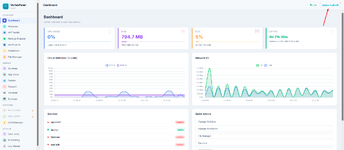
## 🖥 Dashboard & Monitoring
- **Realtime charts** — CPU/RAM history and Network I/O, client-side rolling window, no backend polling changes needed
- **Global SSL expiry banner** — aggregates certificate expiry across every site, warns at 14 days with severity-graded colour coding (yellow → orange → red-for-expired)
- **Settings → Audit Log viewer** — last 200 login attempts (time/status/IP/user/note) — the backend already existed, it just had no UI until now
- **Per-site disk usage** — lazy-loaded (only fires when you open a site's Directory tab, so it doesn't slow down the Websites list on servers with many/large sites)
---
## 🛠 Reliability — RHEL-Family & arm64 Fixes
A full audit turned up (and fixed) install-time failures that were silently breaking on real-world server configurations:
- **RHEL/CentOS/Fedora/AlmaLinux/Rocky** — **nginx, MySQL, Caddy, MongoDB, and PostgreSQL** were previously **completely uninstallable** on any RHEL-family distro. The install scripts only had a Debian-specific GPG-keyring + `sources.list` code path; on RHEL this produced garbage commands (`dpkg -i` on a distro with no `dpkg`, Debian package names fed to `dnf`, etc.). All 5 now have proper distro-aware install paths — MySQL uses RHEL's built-in AppStream module stream (no external repo needed at all), PostgreSQL correctly disables the conflicting built-in module before installing PGDG's versioned packages.
- **arm64** — MongoDB and PostgreSQL RHEL install paths had hardcoded `x86_64` in the repo URLs, silently breaking on ARM servers. MongoDB now uses `dnf`'s auto-resolving `$basearch`; PostgreSQL detects the real architecture via `uname -m`.
- **A pre-existing Caddy bug** (not new — this predates the audit) was piping a fetched GPG key into `rm -f` instead of `gpg --dearmor`, producing an empty/invalid keyring on **Debian too**, not just RHEL. Fixed.
- All module install/uninstall cycles audited for safety on repeat runs — GPG keys and repo files are now properly cleaned up on uninstall, preventing reinstall failures.
---
## 🎨 UI System — Modal & Layout Fixes
A cluster of related frontend bugs, all traced to the same root causes and fixed together:
- **Modal centering** — the underlying issue was `position:fixed` breaking when nested inside a scrolling ancestor (`overflow-y:auto` containers). All modals are now rendered as direct children of `<body>` via a shared global portal pattern, using explicit `width:100vw;height:100vh` so they're immune to any ancestor's overflow settings.
- **Horizontal scrollbar shifting the entire panel** — a classic flexbox `min-width:auto` trap: `.main-area` and `.page-content` were `flex:1` with no `min-width:0`, so a single unconstrained `<select>` dropdown with long option text (App Store version pickers) could force the *whole layout* wider instead of scrolling internally. Fixed at the source, plus a body-level safety net.
- **Cross-component scoping bugs** — several modals had their interactive functions defined inside the wrong Alpine.js component (a page's own scope instead of the global scope the portal actually renders in), causing buttons to silently do nothing. Standardized on the same pattern used by `toast()`/`get()`/`post()`: plain global functions, reachable from any component.
- Eight pages (`dashboard`, `docker`, `settings`, `files`, `mail`, `bandwidth`, `security`, `caddy`) had dead method calls in their tab-refresh event listeners from an earlier bulk edit — switching to those tabs was silently failing. All fixed.
---
## 🔩 Smaller Fixes
- Self-hosted SVG brand logos for all App Store modules — zero CDN dependency for icons
- nginx version bump — Stable 1.30.3, Mainline 1.31.2 (security patch)
- Update-check false positive (was comparing git hash against semver)
- Databases page now auto-detects MongoDB/PostgreSQL correctly with engine-aware columns
- Install/uninstall hang fixes — proper timeouts (10min install, 5min uninstall, 8min switch), service-stop-before-remove ordering
- `install.sh` now clones to a permanent `/root/Vortexpanel` instead of `/tmp` (which gets wiped on reboot, silently orphaning git tracking) — and auto-generates a correctly-pathed `deploy.sh` during install
 

About us

  • Babiato Forum - The webmaster community has been around for many years and pride ourselves on offering unbiased, critical discussion among people of all different backgrounds. We are working every day, updating Daily resource to make sure our community is one of the best.

Quick Navigation

User Menu