WordPress Download Manager Pro

WordPress Download Manager Pro v7.6.7 Nulled + All Addons

No permission to download
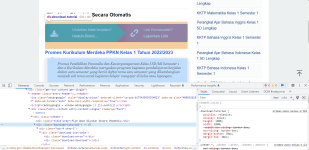
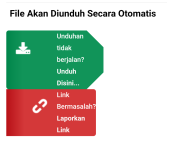
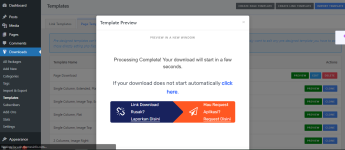
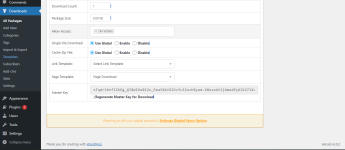
I try use the download manager addon but didn't find any style and setup like two style above
 
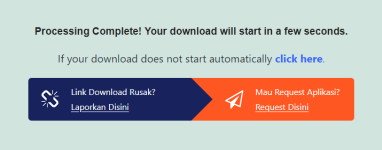
What about last one? Any idea? Thanks before 🙏

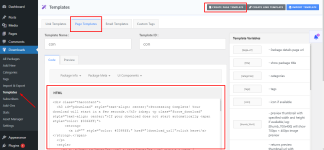
Create new Template.

HTML:
<div class="thecontent">
  <h3 id="pdownload" style="text-align: center;">Processing Complete! Your download will start in a few seconds.</h3> &nbsp; <p class="force_download" style="text-align: center;">If your download does not start automatically <span style="color: #3366ff;">
      <strong>
        <a id="" style="color: #3366ff;" href="[download_url]">click here</a></strong>.</span>
  </p>
  <style>
    img.attachment-schema-featured.size-schema-featured.wp-post-image {
      display: none !important;
    }

    ul.essb_links_list.essb_force_hide_name.essb_force_hide {
      display: none !important;
    }

    .post-info {
      display: none !important;
    }

    h3#pdownload {
      margin-bottom: -15px !important;
    }

    h1.title.single-title.entry-title {
      margin-bottom: 60px;
    }
  </style>
  <div class="download-page">
    <div class="box-4 step-1">
      <div class="download-icon-anim">
        <div class="download-arrow"></div>
      </div>
      <div class="title">
        <span>Link Download Rusak?</span>
        <br>
       
          <span style="color: #ffffff;">
            <a style="color: #ffffff !important; text-decoration: underline;" href="/laporkan-link/" target="_blank" rel="noopener noreferrer">Laporkan Disini</a>
          </span>
      </div>
    </div>
    <div class="box-4 step-3">
      <div class="download-icon-anim">
        <div class="download-send"></div>
      </div>
      <div class="title">Mau Request Aplikasi? <br>
          <span style="color: #ffffff;">
            <a style="color: #ffffff !important; text-decoration: underline;" href="/request-software/" target="_blank" rel="noopener noreferrer">Request Disini</a>
          </span>
      </div>
    </div>
    <div style="clear: both;"></div>
  </div>
</div>

CSS:
h3 {
    font-family: Helvetica, Arial, sans-serif;
    font-weight: normal;
    font-size: 19px !important;
    color: #222222;
    line-height: 1.4 !important;
}

.entry-content h3 {
    text-transform: none;
    font-weight: bold !important;
}

h3#pdownload {
    margin-bottom: -15px!important !important;
}

.entry-content p {
    margin-bottom: 20px !important;
}

.download-page {
    position: relative;
    display: block;
    height: 80px;
    width: 100%;
    -webkit-box-sizing: border-box;
    box-sizing: border-box;
    margin-bottom: 20px;
    margin-top: 20px;
}

.box-4 {
    width: 50%;
}

.box-4:first-child {
    float: left;
}

.download-page .box-4 {
    position: relative;
    display: table;
    height: 80px;
}

.download-page .step-1 {
    background: -webkit-linear-gradient(left, #00854a, #119459 20%);
    background: -o-linear-gradient(right, #00854a, #119459 20%);
    background: -webkit-gradient(linear, left top, right top, from(#00854a), color-stop(20%, #119459));
    background: -o-linear-gradient(left, #00854a, #119459 20%);
    background: linear-gradient(90deg, #18225D, #18225D 20%);
    border-radius: 6px 0 0 6px;
}

.download-icon-anim, .download-icon-anim>div {
    position: absolute;
    left: 0;
    top: 0;
    width: 80px;
    height: 80px;
}

.download-arrow {
    background-image: url(https://www.nesabamedia.com/wp-content/uploads/2020/12/brokenlink-icon3.png);
    -webkit-animation: arrowUpDown 1s ease-in-out infinite;
    animation: arrowUpDown 1s ease-in-out infinite;
}

.download-icon-anim, .download-icon-anim>div {
    position: absolute;
    left: 0;
    top: 0;
    width: 80px;
    height: 80px;
}

.download-icon-anim>div {
    background-repeat: no-repeat;
    background-position: 50%;
}

.title {
    clear: both;
}

.download-page .box-4 .title {
    display: table-cell;
    vertical-align: middle;
    padding-left: 120px;
    font-size: 16px;
    line-height: 28px;
    color: #fff;
    font-weight: normal;
    text-transform: capitalize;
    text-align: left;
}

.download-page .step-1 .title {
    padding-left: 80px;
    font-weight: normal;
    text-transform: capitalize;
    text-align: left;
}

.download-page .step-1:after {
    position: absolute;
    width: 40px;
    height: 100%;
    right: -40px;
    top: 0;
    content: "";
    z-index: 1;
    border-top: 40px solid hsla(0, 0%, 100%, 0);
    border-bottom: 40px solid hsla(0, 0%, 100%, 0);
    border-left: 40px solid #18225D;
    -webkit-box-sizing: border-box;
    box-sizing: border-box;
}

.download-page .step-3 {
    background: -webkit-linear-gradient(left, #b81017, #d43839 20%);
    background: -o-linear-gradient(right, #b81017, #d43839 20%);
    background: -webkit-gradient(linear, left top, right top, from(#b81017), color-stop(20%, #d43839));
    background: -o-linear-gradient(left, #b81017, #d43839 20%);
    background: linear-gradient(90deg, #FF5722, #FF5722 20%);
    border-radius: 0 6px 6px 0;
}

.download-send {
    background-image: url(https://www.nesabamedia.com/wp-content/uploads/2020/12/sendme-icon.png);
}

.download-icon-anim, .download-icon-anim>div {
    position: absolute;
    left: 0;
    top: 0;
    width: 80px;
    height: 80px;
}

.download-icon-anim>div {
    background-repeat: no-repeat;
    background-position: 50%;
}

.download-page .box-4:nth-child(2) .download-icon-anim>div, .download-page .box-4:nth-child(3) .download-icon-anim>div {
    left: 40px;
}

@media (max-width: 425px){
.download-page {
    height: auto;
    padding: 0 5px;
}
.download-page .box-4 {
    width: 100%;
    margin-bottom: 10px;
    float: none;
    border-radius: 6px;
    padding: 10px 0;
}
.download-page .box-4:nth-child(2) .download-icon-anim>div, .download-page .box-4:nth-child(3) .download-icon-anim>div, .download-icon-anim {
    left: 0;
    top: auto;
}
.download-page .box-4 .title {
    padding-left: 80px;
}
.download-page .step-1:after {display: none;}

}


Screenshot_471.png
 
Last edited:
Create new Template.

HTML:
<div class="thecontent">
  <h3 id="pdownload" style="text-align: center;">Processing Complete! Your download will start in a few seconds.</h3> &nbsp; <p class="force_download" style="text-align: center;">If your download does not start automatically <span style="color: #3366ff;">
      <strong>
        <a id="" style="color: #3366ff;" href="[download_url]">click here</a></strong>.</span>
  </p>
  <style>
    img.attachment-schema-featured.size-schema-featured.wp-post-image {
      display: none !important;
    }

    ul.essb_links_list.essb_force_hide_name.essb_force_hide {
      display: none !important;
    }

    .post-info {
      display: none !important;
    }

    h3#pdownload {
      margin-bottom: -15px !important;
    }

    h1.title.single-title.entry-title {
      margin-bottom: 60px;
    }
  </style>
  <div class="download-page">
    <div class="box-4 step-1">
      <div class="download-icon-anim">
        <div class="download-arrow"></div>
      </div>
      <div class="title">
        <span>Link Download Rusak?</span>
        <br>
      
          <span style="color: #ffffff;">
            <a style="color: #ffffff !important; text-decoration: underline;" href="/laporkan-link/" target="_blank" rel="noopener noreferrer">Laporkan Disini</a>
          </span>
      </div>
    </div>
    <div class="box-4 step-3">
      <div class="download-icon-anim">
        <div class="download-send"></div>
      </div>
      <div class="title">Mau Request Aplikasi? <br>
          <span style="color: #ffffff;">
            <a style="color: #ffffff !important; text-decoration: underline;" href="/request-software/" target="_blank" rel="noopener noreferrer">Request Disini</a>
          </span>
      </div>
    </div>
    <div style="clear: both;"></div>
  </div>
</div>

CSS:
h3 {
    font-family: Helvetica, Arial, sans-serif;
    font-weight: normal;
    font-size: 19px !important;
    color: #222222;
    line-height: 1.4 !important;
}

.entry-content h3 {
    text-transform: none;
    font-weight: bold !important;
}

h3#pdownload {
    margin-bottom: -15px!important !important;
}

.entry-content p {
    margin-bottom: 20px !important;
}

.download-page {
    position: relative;
    display: block;
    height: 80px;
    width: 100%;
    -webkit-box-sizing: border-box;
    box-sizing: border-box;
    margin-bottom: 20px;
    margin-top: 20px;
}

.box-4 {
    width: 50%;
}

.box-4:first-child {
    float: left;
}

.download-page .box-4 {
    position: relative;
    display: table;
    height: 80px;
}

.download-page .step-1 {
    background: -webkit-linear-gradient(left, #00854a, #119459 20%);
    background: -o-linear-gradient(right, #00854a, #119459 20%);
    background: -webkit-gradient(linear, left top, right top, from(#00854a), color-stop(20%, #119459));
    background: -o-linear-gradient(left, #00854a, #119459 20%);
    background: linear-gradient(90deg, #18225D, #18225D 20%);
    border-radius: 6px 0 0 6px;
}

.download-icon-anim, .download-icon-anim>div {
    position: absolute;
    left: 0;
    top: 0;
    width: 80px;
    height: 80px;
}

.download-arrow {
    background-image: url(https://www.nesabamedia.com/wp-content/uploads/2020/12/brokenlink-icon3.png);
    -webkit-animation: arrowUpDown 1s ease-in-out infinite;
    animation: arrowUpDown 1s ease-in-out infinite;
}

.download-icon-anim, .download-icon-anim>div {
    position: absolute;
    left: 0;
    top: 0;
    width: 80px;
    height: 80px;
}

.download-icon-anim>div {
    background-repeat: no-repeat;
    background-position: 50%;
}

.title {
    clear: both;
}

.download-page .box-4 .title {
    display: table-cell;
    vertical-align: middle;
    padding-left: 120px;
    font-size: 16px;
    line-height: 28px;
    color: #fff;
    font-weight: normal;
    text-transform: capitalize;
    text-align: left;
}

.download-page .step-1 .title {
    padding-left: 80px;
    font-weight: normal;
    text-transform: capitalize;
    text-align: left;
}

.download-page .step-1:after {
    position: absolute;
    width: 40px;
    height: 100%;
    right: -40px;
    top: 0;
    content: "";
    z-index: 1;
    border-top: 40px solid hsla(0, 0%, 100%, 0);
    border-bottom: 40px solid hsla(0, 0%, 100%, 0);
    border-left: 40px solid #18225D;
    -webkit-box-sizing: border-box;
    box-sizing: border-box;
}

.download-page .step-3 {
    background: -webkit-linear-gradient(left, #b81017, #d43839 20%);
    background: -o-linear-gradient(right, #b81017, #d43839 20%);
    background: -webkit-gradient(linear, left top, right top, from(#b81017), color-stop(20%, #d43839));
    background: -o-linear-gradient(left, #b81017, #d43839 20%);
    background: linear-gradient(90deg, #FF5722, #FF5722 20%);
    border-radius: 0 6px 6px 0;
}

.download-send {
    background-image: url(https://www.nesabamedia.com/wp-content/uploads/2020/12/sendme-icon.png);
}

.download-icon-anim, .download-icon-anim>div {
    position: absolute;
    left: 0;
    top: 0;
    width: 80px;
    height: 80px;
}

.download-icon-anim>div {
    background-repeat: no-repeat;
    background-position: 50%;
}

.download-page .box-4:nth-child(2) .download-icon-anim>div, .download-page .box-4:nth-child(3) .download-icon-anim>div {
    left: 40px;
}

@media (max-width: 425px){
.download-page {
    height: auto;
    padding: 0 5px;
}
.download-page .box-4 {
    width: 100%;
    margin-bottom: 10px;
    float: none;
    border-radius: 6px;
    padding: 10px 0;
}
.download-page .box-4:nth-child(2) .download-icon-anim>div, .download-page .box-4:nth-child(3) .download-icon-anim>div, .download-icon-anim {
    left: 0;
    top: auto;
}
.download-page .box-4 .title {
    padding-left: 80px;
}
.download-page .step-1:after {display: none;}

}


Screenshot_471.png
Thanks for your effort, this is just use CSS or also using download manager plugin?
 
I'm still confused about how to make it auto download. if we use lazy load, the settings are on a separate page.